
Stripe
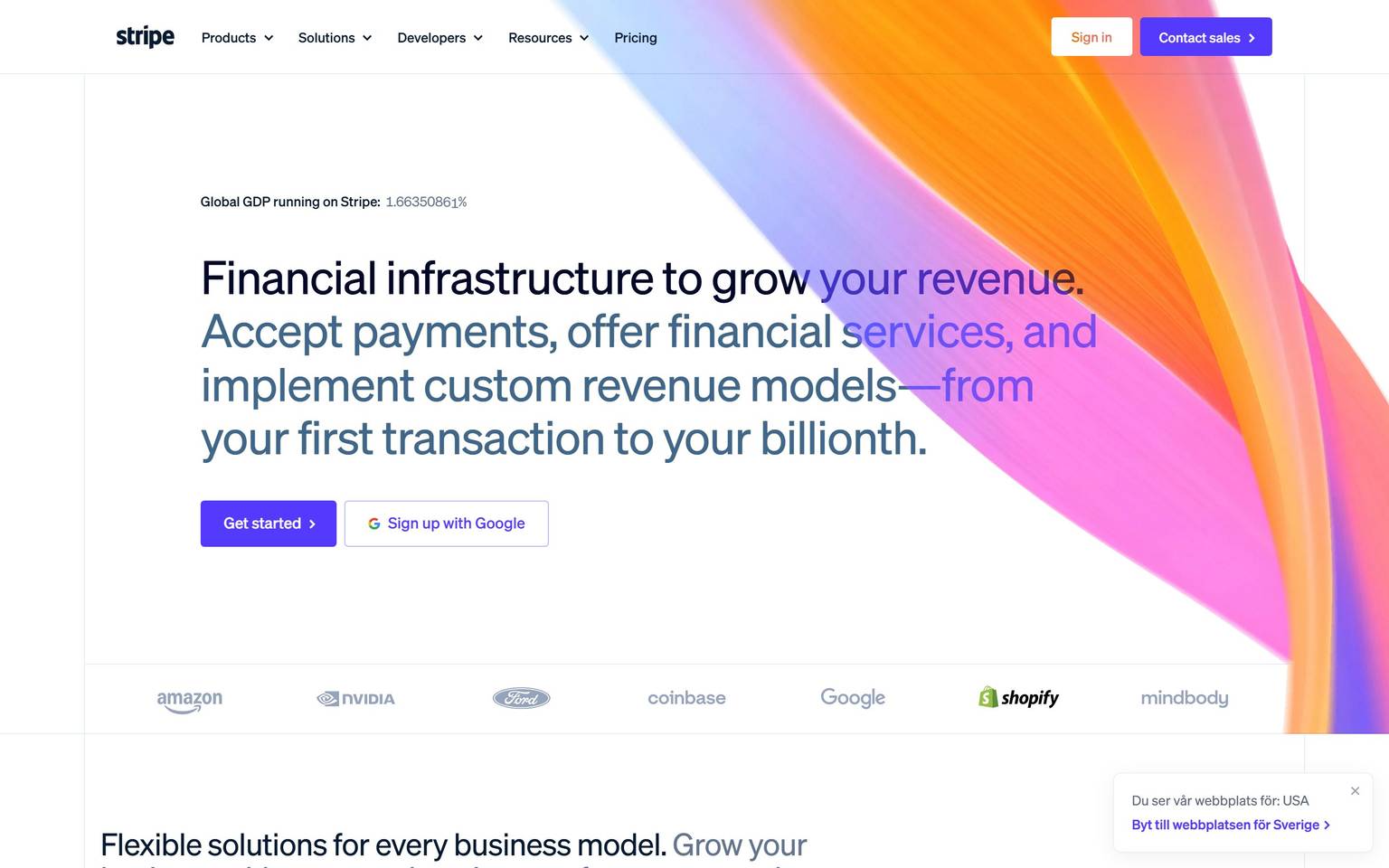
The reference point for fintech marketing design — white canvas with deep navy ink, a violet-blurple action color, and light-weight Söhne typography at editorial scale. Brand voltage comes from the famous animated gradient hero (pink/orange/yellow/violet stops), diagonally skewed section seams, and real product UI screenshots framed inside the marketing flow. Buttons are compact pills; everything else is rectangles with restrained 6–16px radii. The system reads as precision infrastructure with one expressive, painterly surface at the top of the page.
Works withClaude CodeCursorCodexGemini CLICopilotv0LovableBoltWindsurfReplit
---
version: alpha
name: Stripe-design-analysis
description: The reference point for fintech marketing design — white canvas with deep navy ink, a violet-blurple action color, and light-weight Söhne typography at editorial scale. Brand voltage comes from the famous animated gradient hero (pink/orange/yellow/violet stops), diagonally skewed section seams, and real product UI screenshots framed inside the marketing flow. Buttons are compact pills; everything else is rectangles with restrained 6–16px radii. The system reads as precision infrastructure with one expressive, painterly surface at the top of the page.
colors:
  primary: "#533afd"
  primary-active: "#4032c8"
  primary-soft: "#e8e9ff"
  primary-faint: "#f5f5ff"
  ink: "#061b31"
  body: "#50617a"
  muted: "#64748d"
  quiet: "#7d8ba4"
  canvas: "#ffffff"
  surface-subdued: "#f8fafd"
  surface-soft: "#f6f9fc"
  hairline: "#e5edf5"
  hairline-strong: "#d4dee9"
  surface-dark: "#0d1738"
  surface-dark-elevated: "#122054"
  on-primary: "#ffffff"
  on-dark: "#ffffff"
  on-dark-muted: "#95a4ba"
  link-on-dark: "#b4d8ff"
  overlay-light: "#ffffffa6"
  gradient-pink: "#fb76fa"
  gradient-orange: "#ff6118"
  gradient-yellow: "#ffcf5e"
  gradient-blue: "#0073e6"
  stat-violet: "#8a35df"
  success: "#00d66f"
  warning: "#f5a623"
  error: "#ea2261"
typography:
  display-hero:
    fontFamily: "sohne-var, SF Pro Display, sans-serif"
    fontSize: 64px
    fontWeight: 300
    lineHeight: 1.04
    letterSpacing: -0.02em
  heading-xxl:
    fontFamily: "sohne-var, SF Pro Display, sans-serif"
    fontSize: 34px
    fontWeight: 300
    lineHeight: 1.03
    letterSpacing: -0.02em
  heading-xl:
    fontFamily: "sohne-var, SF Pro Display, sans-serif"
    fontSize: 28px
    fontWeight: 300
    lineHeight: 1.07
    letterSpacing: -0.01em
  heading-lg:
    fontFamily: "sohne-var, SF Pro Display, sans-serif"
    fontSize: 22px
    fontWeight: 300
    lineHeight: 1.2
    letterSpacing: -0.01em
  heading-md:
    fontFamily: "sohne-var, SF Pro Display, sans-serif"
    fontSize: 20px
    fontWeight: 300
    lineHeight: 1.2
    letterSpacing: -0.01em
  heading-sm:
    fontFamily: "sohne-var, SF Pro Display, sans-serif"
    fontSize: 18px
    fontWeight: 300
    lineHeight: 1.25
    letterSpacing: 0
  body-lg:
    fontFamily: "sohne-var, SF Pro Display, sans-serif"
    fontSize: 18px
    fontWeight: 300
    lineHeight: 1.4
    letterSpacing: 0
  body-md:
    fontFamily: "sohne-var, SF Pro Display, sans-serif"
    fontSize: 16px
    fontWeight: 300
    lineHeight: 1.4
    letterSpacing: 0
  body-sm:
    fontFamily: "sohne-var, SF Pro Display, sans-serif"
    fontSize: 14px
    fontWeight: 300
    lineHeight: 1.4
    letterSpacing: 0
  quote:
    fontFamily: "sohne-var, SF Pro Display, sans-serif"
    fontSize: 18px
    fontWeight: 300
    lineHeight: 1.4
    letterSpacing: 0
  caption:
    fontFamily: "sohne-var, SF Pro Display, sans-serif"
    fontSize: 12px
    fontWeight: 400
    lineHeight: 1.35
    letterSpacing: 0
  code:
    fontFamily: "SourceCodePro, SFMono-Regular, monospace"
    fontSize: 14px
    fontWeight: 400
    lineHeight: 1.5
    letterSpacing: 0
  button:
    fontFamily: "sohne-var, SF Pro Display, sans-serif"
    fontSize: 15px
    fontWeight: 425
    lineHeight: 1
    letterSpacing: 0
  nav-link:
    fontFamily: "sohne-var, SF Pro Display, sans-serif"
    fontSize: 15px
    fontWeight: 425
    lineHeight: 1.4
    letterSpacing: 0
rounded:
  xs: 2px
  sm: 4px
  md: 6px
  lg: 16px
  xl: 32px
  pill: 99999px
  full: 99999px
spacing:
  xs: 8px
  sm: 16px
  md: 24px
  lg: 32px
  xl: 40px
  xxl: 48px
  section-sm: 56px
  section: 64px
  section-lg: 96px
components:
  button-primary:
    backgroundColor: "{colors.primary}"
    textColor: "{colors.on-primary}"
    typography: "{typography.button}"
    rounded: "{rounded.pill}"
    padding: 6px 16px
    height: 36px
  button-primary-active:
    backgroundColor: "{colors.primary-active}"
    textColor: "{colors.on-primary}"
    rounded: "{rounded.pill}"
  button-on-dark:
    backgroundColor: "{colors.overlay-light}"
    textColor: "{colors.ink}"
    typography: "{typography.button}"
    rounded: "{rounded.pill}"
    padding: 6px 16px
    height: 36px
  link-arrow:
    backgroundColor: transparent
    textColor: "{colors.primary}"
    typography: "{typography.button}"
  link-arrow-on-dark:
    backgroundColor: transparent
    textColor: "{colors.link-on-dark}"
    typography: "{typography.button}"
  top-nav:
    backgroundColor: transparent
    textColor: "{colors.ink}"
    typography: "{typography.nav-link}"
    height: 64px
  top-nav-on-gradient:
    backgroundColor: transparent
    textColor: "{colors.on-dark}"
    typography: "{typography.nav-link}"
    height: 64px
  hero-band:
    backgroundColor: "{colors.canvas}"
    textColor: "{colors.ink}"
    typography: "{typography.display-hero}"
    padding: 96px
  section-band-light:
    backgroundColor: "{colors.surface-soft}"
    textColor: "{colors.ink}"
    padding: 96px
  section-band-dark:
    backgroundColor: "{colors.surface-dark}"
    textColor: "{colors.on-dark}"
    padding: 96px
  feature-column:
    backgroundColor: transparent
    textColor: "{colors.body}"
    typography: "{typography.body-md}"
  feature-card:
    backgroundColor: "{colors.canvas}"
    textColor: "{colors.ink}"
    typography: "{typography.heading-md}"
    rounded: "{rounded.lg}"
    padding: 32px
  product-screenshot-frame:
    backgroundColor: "{colors.canvas}"
    rounded: "{rounded.lg}"
  stat-highlight:
    backgroundColor: transparent
    textColor: "{colors.stat-violet}"
    typography: "{typography.heading-xl}"
  badge-pill:
    backgroundColor: "{colors.primary-soft}"
    textColor: "{colors.primary}"
    typography: "{typography.caption}"
    rounded: "{rounded.pill}"
    padding: 2px 10px
  testimonial-quote:
    backgroundColor: transparent
    textColor: "{colors.ink}"
    typography: "{typography.quote}"
  text-input:
    backgroundColor: "{colors.canvas}"
    textColor: "{colors.ink}"
    typography: "{typography.body-sm}"
    rounded: "{rounded.md}"
    padding: 8px 12px
    height: 40px
  code-block:
    backgroundColor: "{colors.surface-dark}"
    textColor: "{colors.on-dark}"
    typography: "{typography.code}"
    rounded: "{rounded.lg}"
    padding: 24px
  footer:
    backgroundColor: "{colors.surface-soft}"
    textColor: "{colors.body}"
    typography: "{typography.body-sm}"
    padding: 64px
---

## Overview

Stripe's marketing surface is the genre-defining fintech editorial system: white canvas (`{colors.canvas}`), deep navy ink (`{colors.ink}` — #061b31, a blue-black rather than a neutral black), and a single violet-blurple action color (`{colors.primary}` — #533afd) carried by compact pill buttons. Typography is **Söhne** (served as the variable font `sohne-var`) at light weights — even the largest headlines sit at weight 300, trusting scale and tight leading (1.03–1.07) instead of boldness.

The system's expressive budget is spent in exactly one place: the **animated gradient hero**, a painterly mesh of pink/orange/yellow/violet (`{colors.gradient-pink}`, `{colors.gradient-orange}`, `{colors.gradient-yellow}`, around the brand violet) that bleeds behind the navigation and hero headline. Everything below it is disciplined: editorial columns, real product screenshots in floating frames, diagonally skewed section seams (~6°), and generous-but-not-extravagant 64–96px section rhythm.

Stripe's neutrals are not gray — the whole neutral ramp is blue-tinted (#f8fafd → #50617a → #061b31), which is what makes white Stripe pages feel "cool" and precise. Dark bands (`{colors.surface-dark}` — #0d1738, an indigo-navy) appear mid-page for code/product sections, not just at the footer; the footer itself stays light (`{colors.surface-soft}`).

**Key Characteristics:**
- One action color: blurple `{colors.primary}` on pill buttons (`{rounded.pill}`) at compact 36px height — small buttons, big type.
- Light-weight display type: Söhne at weight 300 from 64px heroes down to 18px sub-heads; weight 425 (a variable-font "book-medium") for buttons and nav.
- Blue-tinted neutral ramp: ink #061b31, body #50617a, hairlines #e5edf5 — never warm grays.
- The gradient is the brand: animated pink/orange/yellow/violet mesh, used once per page at the hero (sometimes echoed in small chart accents), never on buttons or cards.
- Diagonal section geometry: bands shear at roughly −6° creating the signature sliced-page composition.
- Real product UI as marketing imagery: dashboards, checkout, terminals rendered in `{component.product-screenshot-frame}` with soft layered shadows.
- Radius discipline: 6px (`{rounded.md}`) for inputs/controls, 16px (`{rounded.lg}`) for cards and screenshot frames, pills only for buttons and badges.
- Mid-page dark bands `{colors.surface-dark}` host code samples and developer content; the footer stays light.

## Colors

### Brand & Accent
- **Primary** (`{colors.primary}` — #533afd): Stripe's current blurple (brand-600 in their token system). All primary CTAs and inline links. Press/active shifts to `{colors.primary-active}` (#4032c8, brand-700).
- **Primary Soft / Faint** (`{colors.primary-soft}` #e8e9ff, `{colors.primary-faint}` #f5f5ff): pale violet washes for badges, highlighted rows, and section tints.
- **Gradient stops** (`{colors.gradient-pink}` #fb76fa, `{colors.gradient-orange}` #ff6118, `{colors.gradient-yellow}` #ffcf5e, `{colors.gradient-blue}` #0073e6): the animated hero mesh cycles through these around the brand violet. They are *atmosphere colors* — never used for UI states or text.
- **Stat Violet** (`{colors.stat-violet}` — #8a35df): oversized metric callouts in customer-story sections.

### Surface
- **Canvas** (`{colors.canvas}` — #ffffff): default page floor.
- **Surface Soft** (`{colors.surface-soft}` — #f6f9fc): alternating light bands and the footer — a barely-blue off-white.
- **Surface Subdued** (`{colors.surface-subdued}` — #f8fafd): cards-on-soft-bands, table stripes (neutral-25 in their ramp).
- **Surface Dark** (`{colors.surface-dark}` — #0d1738): mid-page developer/code bands; an indigo-navy, warmer than the ink color. Elevated cards inside dark bands use `{colors.surface-dark-elevated}` (#122054).
- **Hairline** (`{colors.hairline}` #e5edf5 / `{colors.hairline-strong}` #d4dee9): 1px rules and input borders — visibly blue-tinted.

### Text
- **Ink** (`{colors.ink}` — #061b31): headlines and emphasis (their `text-solid`, neutral-990). A blue-black; using pure #000 reads off-brand.
- **Body** (`{colors.body}` — #50617a): default paragraph color (neutral-600).
- **Muted / Quiet** (`{colors.muted}` #64748d, `{colors.quiet}` #7d8ba4): secondary text, captions, timestamps.
- **On Dark** (`{colors.on-dark}` #ffffff, `{colors.on-dark-muted}` #95a4ba): text in dark bands; links on dark use `{colors.link-on-dark}` (#b4d8ff), a light sky blue — not the blurple.

### Semantic
- **Success** (`{colors.success}` — #00d66f), **Warning** (`{colors.warning}` — #f5a623), **Error** (`{colors.error}` — #ea2261): appear mostly inside product screenshots and pricing comparison checks; the marketing chrome itself rarely uses semantic colors.

## Typography

### Font Family
Everything runs on **Söhne** (Klim Type Foundry), served as the variable font `sohne-var` with `"SF Pro Display", sans-serif` fallback. Code samples use **Source Code Pro** (`SourceCodePro, SFMono-Regular, monospace`).

The voice is *light and large*: display and heading roles all sit at weight **300**, with tightening letter-spacing as size grows (0 → −0.02em) and very tight leading at the top (1.03–1.07). Interface text (buttons, nav) steps up to weight **425** — a variable-axis value between regular and medium that reads as quietly confident rather than bold.

### Hierarchy

| Token | Size | Weight | Line Height | Letter Spacing | Use |
|---|---|---|---|---|---|
| `{typography.display-hero}` | 64px† | 300 | 1.04 | -0.02em | Homepage h1 ("Financial infrastructure to grow your revenue") |
| `{typography.heading-xxl}` | 34px | 300 | 1.03 | -0.02em | Section heads |
| `{typography.heading-xl}` | 28px | 300 | 1.07 | -0.01em | Sub-section heads, stat numbers |
| `{typography.heading-lg}` | 22px | 300 | 1.2 | -0.01em | Card titles, feature heads |
| `{typography.heading-md}` | 20px | 300 | 1.2 | -0.01em | Feature column titles |
| `{typography.heading-sm}` | 18px | 300 | 1.25 | 0 | Eyebrow-adjacent sub-heads |
| `{typography.body-lg}` | 18px | 300 | 1.4 | 0 | Hero sub-copy, intro paragraphs |
| `{typography.body-md}` | 16px | 300 | 1.4 | 0 | Default running text |
| `{typography.body-sm}` | 14px | 300 | 1.4 | 0 | Footer, fine print, captions |
| `{typography.quote}` | 18px | 300 | 1.4 | 0 | Customer quotes |
| `{typography.caption}` | 12px | 400 | 1.35 | 0 | Badges, labels |
| `{typography.code}` | 14px | 400 | 1.5 | 0 | Code samples — Source Code Pro |
| `{typography.button}` | 15px | 425 | 1.0 | 0 | Button labels |
| `{typography.nav-link}` | 15px | 425 | 1.4 | 0 | Top-nav items |

† Display sizes are fluid: the heading scale is defined in their CSS at the values above and scales up substantially on wide viewports via `min()`/`clamp()` expressions (the homepage h1 renders anywhere from ~34px on mobile to well above 64px on wide desktop). 64px is a representative desktop value — see Known Gaps.

### Principles
Scale over weight: hierarchy is created by size and leading, never by bolding (display stays at 300 everywhere). Letter-spacing tightens as size grows. Weight 425 is reserved for interactive labels — it's the system's only "medium".

### Note on Font Substitutes
**Söhne is a licensed typeface** (Klim Type Foundry) and not freely available. Their own fallback is `SF Pro Display` (Apple platforms only). Cross-platform substitute: **Inter** at weight 300 for display roles with −0.02em tracking, weight 500 for button/nav labels — Inter is more neutral/less grotesque-warm than Söhne but preserves the light-and-large signature. **Suisse Int'l** or **Untitled Sans** are closer commercial matches.

## Layout

### Spacing System
- **Scale** (their core tokens): `{spacing.xs}` 8px · `{spacing.sm}` 16px · `{spacing.md}` 24px · `{spacing.lg}` 32px · `{spacing.xl}` 40px · `{spacing.xxl}` 48px · `{spacing.section-sm}` 56px · `{spacing.section}` 64px · `{spacing.section-lg}` 96px.
- **Section rhythm**: bands separate by 56–96px (`section-sm`→`section-lg`); the gradient hero takes more (~96px+ of headroom below the nav).
- **Card padding**: `{spacing.lg}` (32px) for feature cards; code blocks `{spacing.md}` (24px).

### Grid & Container
- **Max content width**: ~1080–1152px centered.
- **Hero**: asymmetric split — headline + CTA left, product screenshot collage right, the gradient field behind both.
- **Feature sections**: 2- and 3-up editorial columns (`{component.feature-column}`) with small icons, heading-md titles, body-md copy, and a `{component.link-arrow}` ("Learn more →") per column.
- **Footer**: light band, 4–5 link columns plus a region/language selector.

### Whitespace Philosophy
Dense for a marketing site: Stripe packs columns, screenshots, stats, and logos into each band, but keeps it readable through the blue-tinted neutral hierarchy and strict typographic scale. Breathing room concentrates around headlines; content blocks sit relatively tight.

## Elevation & Depth

| Level | Treatment | Use |
|---|---|---|
| Flat | none | Editorial columns, footers, text bands |
| Hairline | 1px `{colors.hairline}` | Inputs, table rules, nav dividers on light |
| Card | `{rounded.lg}` + soft layered shadow | Feature cards on soft bands |
| Screenshot frame | `{component.product-screenshot-frame}` + large diffuse shadow stack | Product UI collages — the system's main depth moment |
| Dark band | `{colors.surface-dark}` color block | Code/developer sections — contrast does the elevation |

Shadows are layered and diffuse (multiple stacked rgba shadows at low alpha) rather than single hard drops. The famous depth effect is the floating product-screenshot collage over the gradient.

### Decorative Depth
- The hero gradient is an animated canvas/WebGL mesh — colors shift slowly among the gradient stops. Treat as a living background, not a static asset.
- Section seams shear diagonally (~−6°), so each band's background appears cut at an angle while content stays level.

## Shapes

### Border Radius Scale

| Token | Value | Use |
|---|---|---|
| `{rounded.xs}` | 2px | Tiny controls, checkbox corners |
| `{rounded.sm}` | 4px | Small product-UI buttons inside screenshots, chips |
| `{rounded.md}` | 6px | Inputs, selects, small cards — the workhorse control radius |
| `{rounded.lg}` | 16px | Cards, screenshot frames, code blocks |
| `{rounded.xl}` | 32px | Oversized feature tiles (rare) |
| `{rounded.pill}` | 99999px | Buttons and badges — every CTA is a pill |
| `{rounded.full}` | 99999px / 50% | Avatars, icon dots |

The contrast between pill buttons and rectangular 6–16px everything-else is a Stripe signature: actions are capsules, content is cards.

## Components

### Navigation

**`top-nav`** — Transparent bar over the page canvas, 64px tall, wordmark left, center menu (Products, Solutions, Developers, Resources, Pricing) in `{typography.nav-link}`, right cluster "Sign in" + `{component.button-primary}` ("Contact sales"). Over the gradient hero it renders as `{component.top-nav-on-gradient}` with white text.

### Buttons & Links

**`button-primary`** — Compact blurple pill: `{colors.primary}` background, white label in `{typography.button}` (15px/425), `{rounded.pill}`, ~36px tall with 6px × 16px padding, usually suffixed with a "›" glyph. Active state `{component.button-primary-active}` darkens to `{colors.primary-active}`.

**`button-on-dark`** — On gradient/dark bands: translucent white pill (`{colors.overlay-light}` — #ffffffa6) with ink text; reads as frosted glass over the gradient.

**`link-arrow`** — The "Learn more ›" pattern: no background, `{colors.primary}` text with trailing chevron; on dark bands `{component.link-arrow-on-dark}` switches to `{colors.link-on-dark}` sky blue.

### Bands & Sections

**`hero-band`** — The gradient hero: canvas-level band whose background is the animated gradient mesh; headline in `{typography.display-hero}` ink (or white over saturated gradient regions), sub-copy `{typography.body-lg}`, button row with `{component.button-primary}` + `{component.link-arrow}`, product screenshot collage right.

**`section-band-light`** / **`section-band-dark`** — Alternating editorial bands: soft blue-white (`{colors.surface-soft}`) and indigo-navy (`{colors.surface-dark}`). Dark bands host developer content: code blocks, terminal mock-ups, API copy with `{colors.on-dark-muted}` secondary text. Bands shear ~−6° at their seams.

### Content

**`feature-column`** — The workhorse: small icon (line-style, brand violet), `{typography.heading-md}` title in ink, 2–4 lines of `{typography.body-md}` in `{colors.body}`, and a `{component.link-arrow}`. Appears in 2–4-up grids in nearly every band.

**`feature-card`** — Card variant on soft bands: white surface, `{rounded.lg}`, `{spacing.lg}` padding, soft layered shadow.

**`product-screenshot-frame`** — Real product UI (dashboard, checkout, terminal) in a `{rounded.lg}` frame with a large diffuse shadow stack; often layered/overlapping in collages, sometimes annotated with floating badge-pills.

**`stat-highlight`** — Oversized metric ("250M+ API requests/day") in `{colors.stat-violet}` or ink at `{typography.heading-xl}`+, with a `{typography.body-sm}` muted caption.

**`testimonial-quote`** — Editorial quote in `{typography.quote}` ink with customer logo; no card chrome, sits directly on the band.

**`badge-pill`** — Small `{colors.primary-soft}` pill with `{colors.primary}` caption text: "New", "Preview", product tags.

### Forms & Code

**`text-input`** — White input, `{colors.hairline}` 1px border, `{rounded.md}` (6px), 40px height, `{typography.body-sm}`. Email-capture inputs pair with an attached `{component.button-primary}`.

**`code-block`** — `{colors.surface-dark}` panel, `{rounded.lg}`, `{spacing.md}` padding, Source Code Pro at `{typography.code}` with syntax accents drawn from the gradient family (pink/yellow/blue on navy).

### Footer

**`footer`** — Light: `{colors.surface-soft}` background, 4–5 columns of `{typography.body-sm}` links in `{colors.body}`, region selector, fine print in `{colors.muted}`. Unlike most SaaS systems, Stripe does **not** end dark — dark bands live mid-page.

## Do's and Don'ts

### Do
- Keep one action color: blurple pills for every primary CTA; chevron suffix on button labels ("Start now ›").
- Use weight 300 for all display/heading type and let size carry hierarchy; reserve 425 for buttons and nav.
- Tint the neutrals blue: ink #061b31, body #50617a, hairlines #e5edf5. Pure grays and pure black break the temperature.
- Spend the gradient once per page, at the hero. Echo its colors only in code-syntax highlighting and small chart accents.
- Show real product UI in floating frames with layered diffuse shadows — screenshots are the system's imagery language.
- Shear section seams diagonally (~6°) when composing multi-band pages.
- Use mid-page dark bands for developer/code content; keep the footer light.

### Don't
- Don't bold headlines — no weight above 425 anywhere in the system; 600+ reads as a different brand.
- Don't put gradient colors on buttons, badges, or text links; they are background atmosphere only.
- Don't use warm grays or pure black; the blue-tinted ramp is the system's temperature.
- Don't round content cards beyond `{rounded.lg}` (16px) — pills are exclusively for actions/badges.
- Don't end the page on a dark band; Stripe closes light.
- Don't oversize buttons: CTAs stay ~36px compact pills even under 64px+ headlines.

## Responsive Behavior

### Breakpoints

| Name | Width | Key Changes |
|---|---|---|
| Mobile | < 672px | Hamburger nav; hero collapses to single column, headline scales to ~34px; columns stack 1-up; screenshot collages simplify to one frame |
| Tablet | 672–1024px | 2-up columns; nav keeps top-level items; hero may keep side-by-side at reduced scale |
| Desktop | 1024–1440px | Full layout: 3–4-up columns, collages, diagonal seams |
| Wide | > 1440px | Content caps ~1080–1152px; gradient field and seams keep bleeding full-width |

### Touch Targets
- Pills grow to ~44px height on touch layouts; `{component.text-input}` stays 40px+.
- `{component.link-arrow}` rows gain full-row tap areas on mobile.

### Collapsing Strategy
- Display type is fluid (`clamp`-driven) — it shrinks continuously rather than stepping.
- Feature grids reduce columns (4→2→1) instead of shrinking type.
- The gradient hero keeps its animation on mobile but with a shorter field; screenshot collages reduce to the single most representative frame.
- Dark code bands keep full-bleed; code blocks become horizontally scrollable.

### Image Behavior
- Product screenshots keep native aspect ratio and crop horizontally on small screens.
- Logos rows wrap to two lines below tablet; customer photos crop to `{rounded.lg}` rectangles, not circles.

## Iteration Guide

1. Work one component at a time, referencing its key (`{component.button-primary}`, `{component.section-band-dark}`).
2. Variants (`-active`, `-on-dark`, `-on-gradient`) are separate component entries; never document hover.
3. Use `{token.refs}` everywhere — no inline hex in components.
4. When emphasis is needed: bigger and lighter beats bolder. If type already sits at 300/64px, add space, not weight.
5. The gradient budget is one hero per page. If a design wants more color, use `{colors.primary-soft}` washes or the stat violet.
6. New surfaces should pick from the blue-tinted neutral ramp; never introduce warm grays.
7. Buttons are pills, content is rectangles — if a card got a pill radius or a button got 6px corners, it's off-system.

## Known Gaps

- **Fluid display sizes**: the heading scale is defined at base values (34px/28px/22px…) that scale up on wide viewports through `min()`/`clamp()` expressions; this static-CSS capture did not resolve the rendered desktop maxima. `{typography.display-hero}` at 64px is a representative desktop value — the real homepage h1 ranges roughly 34–90px+ across viewports.
- **Gradient implementation**: the hero gradient is an animated canvas (WebGL) effect, not CSS; stop colors documented here are the observed CSS variables (`#fb76fa`, `#ff6118`, `#ffcf5e`, `#0073e6`) feeding it. Animation timing/mesh behavior out of scope.
- **Diagonal seam angle**: ~−6° estimated visually; the exact `skewY` value was not extracted.
- **Weight semantics**: `sohne-var` is a variable font; weight 300 here maps to an optical weight closer to Söhne Buch than a thin cut, and 425 sits between Regular and Medium. Static substitution should test 300/350 for display.
- **Spacing sub-8px**: their core scale almost certainly includes 2/4px steps (`core-25/50`) that did not appear in the captured CSS; the documented scale starts at 8px.
- **Shadow recipes**: layered shadow stacks on screenshot frames were not captured exactly; treat "large diffuse multi-layer" as direction, not spec.
- **Dashboard/product UI**: this entry documents the marketing surface only; the Stripe Dashboard design system (their `hds` product tokens hint at it) is a separate, future dashboard-surface analysis.
- **Dark theme**: stripe.com offers no user-facing dark mode — dark *bands* are part of the light page composition, so there is no `colors-dark` set; their CSS contains a `neutralDark` ramp used for those bands and embedded product UI.

<!-- Documented by Duply · real-world design systems as ready-to-use DESIGN.md for AI coding agents · https://duply.ai/stripe/design-md -->
Color Palette
Accent
Neutrals
Typography
display-hero64px · 300 · 1.04
The quick brown fox jumpsheading-xxl34px · 300 · 1.03
The quick brown fox jumpsheading-xl28px · 300 · 1.07
The quick brown fox jumpsheading-lg22px · 300 · 1.2
The quick brown fox jumpsheading-md20px · 300 · 1.2
The quick brown fox jumpsheading-sm18px · 300 · 1.25
The quick brown fox jumpsSpacing & Shape
Spacing
| Name | Value | Preview |
|---|---|---|
| xs | 8px | |
| sm | 16px | |
| md | 24px | |
| lg | 32px | |
| xl | 40px | |
| xxl | 48px | |
| section-sm | 56px | |
| section | 64px | |
| section-lg | 96px |
Border Radius
| Name | Value | Preview |
|---|---|---|
| xs | 2px | |
| sm | 4px | |
| md | 6px | |
| lg | 16px | |
| xl | 32px | |
| pill | 99999px | |
| full | 99999px |
FAQ
- What colors does Stripe use?
- Stripe's core palette includes #533afd, #4032c8, #e8e9ff, #f5f5ff, #061b31. The full color set with usage roles (canvas, ink, surfaces, accent, semantic) is documented in the Stripe DESIGN.md.
- What font does Stripe use?
- Stripe's primary typeface is sohne-var. The complete type scale (sizes, weights, line-height and letter-spacing per role), with an open substitute where the original is licensed, is documented in the DESIGN.md.
- What is the Stripe design system?
- The reference point for fintech marketing design — white canvas with deep navy ink, a violet-blurple action color, and light-weight Söhne typography at editorial scale. Brand voltage comes from the famous animated gradient hero (pink/orange/yellow/violet stops), diagonally skewed section seams, and
Get this as a working kit
Stripe Launch Kit + DESIGN.md
$299$225
One-time payment
- A complete production-stack template, styled like Stripe, fully built and wired.
- One-time payment and the codebase is yours. No platform fees, no subscription.
Open it with Claude Code, Cursor, or any coding agent and build in plain language, then ship a complete web app.
- Your private DESIGN.md
- Marketing pages, blog, SEO & legal
- Email capture, newsletter & contact
- Accept payments (Stripe)
- Analytics (GA4 + PostHog)
- One-click deploy
- Auth, login & roles
- A full app dashboard, when you grow
More like this

---
version: alpha
name: Stripe-design-analysis
description: The reference point for fintech marketing design — white canvas with deep navy ink, a violet-blurple action color, and light-weight Söhne typography at editorial scale. Brand voltage comes from the famous animated gradient hero (pink/orange/yellow/violet stops), diagonally skewed section seams, and real product UI screenshots framed inside the marketing flow. Buttons are compact pills; everything else is rectangles with restrained 6–16px radii. The system reads as precision infrastructure with one expressive, painterly surface at the top of the page.
colors:
  primary: "#533afd"
  primary-active: "#4032c8"
  primary-soft: "#e8e9ff"
  primary-faint: "#f5f5ff"
  ink: "#061b31"
  body: "#50617a"
  muted: "#64748d"
  quiet: "#7d8ba4"
  canvas: "#ffffff"
  surface-subdued: "#f8fafd"
  surface-soft: "#f6f9fc"
  hairline: "#e5edf5"
  hairline-strong: "#d4dee9"
  surface-dark: "#0d1738"
  surface-dark-elevated: "#122054"
  on-primary: "#ffffff"
  on-dark: "#ffffff"
  on-dark-muted: "#95a4ba"
  link-on-dark: "#b4d8ff"
  overlay-light: "#ffffffa6"
  gradient-pink: "#fb76fa"
  gradient-orange: "#ff6118"
  gradient-yellow: "#ffcf5e"
  gradient-blue: "#0073e6"
  stat-violet: "#8a35df"
  success: "#00d66f"
  warning: "#f5a623"
  error: "#ea2261"
typography:
  display-hero:
    fontFamily: "sohne-var, SF Pro Display, sans-serif"
    fontSize: 64px
    fontWeight: 300
    lineHeight: 1.04
    letterSpacing: -0.02em
  heading-xxl:
    fontFamily: "sohne-var, SF Pro Display, sans-serif"
    fontSize: 34px
    fontWeight: 300
    lineHeight: 1.03
    letterSpacing: -0.02em
  heading-xl:
    fontFamily: "sohne-var, SF Pro Display, sans-serif"
    fontSize: 28px
    fontWeight: 300
    lineHeight: 1.07
    letterSpacing: -0.01em
  heading-lg:
    fontFamily: "sohne-var, SF Pro Display, sans-serif"
    fontSize: 22px
    fontWeight: 300
    lineHeight: 1.2
    letterSpacing: -0.01em
  heading-md:
    fontFamily: "sohne-var, SF Pro Display, sans-serif"
    fontSize: 20px
    fontWeight: 300
    lineHeight: 1.2
    letterSpacing: -0.01em
  heading-sm:
    fontFamily: "sohne-var, SF Pro Display, sans-serif"
    fontSize: 18px
    fontWeight: 300
    lineHeight: 1.25
    letterSpacing: 0
  body-lg:
    fontFamily: "sohne-var, SF Pro Display, sans-serif"
    fontSize: 18px
    fontWeight: 300
    lineHeight: 1.4
    letterSpacing: 0
  body-md:
    fontFamily: "sohne-var, SF Pro Display, sans-serif"
    fontSize: 16px
    fontWeight: 300
    lineHeight: 1.4
    letterSpacing: 0
  body-sm:
    fontFamily: "sohne-var, SF Pro Display, sans-serif"
    fontSize: 14px
    fontWeight: 300
    lineHeight: 1.4
    letterSpacing: 0
  quote:
    fontFamily: "sohne-var, SF Pro Display, sans-serif"
    fontSize: 18px
    fontWeight: 300
    lineHeight: 1.4
    letterSpacing: 0
  caption:
    fontFamily: "sohne-var, SF Pro Display, sans-serif"
    fontSize: 12px
    fontWeight: 400
    lineHeight: 1.35
    letterSpacing: 0
  code:
    fontFamily: "SourceCodePro, SFMono-Regular, monospace"
    fontSize: 14px
    fontWeight: 400
    lineHeight: 1.5
    letterSpacing: 0
  button:
    fontFamily: "sohne-var, SF Pro Display, sans-serif"
    fontSize: 15px
    fontWeight: 425
    lineHeight: 1
    letterSpacing: 0
  nav-link:
    fontFamily: "sohne-var, SF Pro Display, sans-serif"
    fontSize: 15px
    fontWeight: 425
    lineHeight: 1.4
    letterSpacing: 0
rounded:
  xs: 2px
  sm: 4px
  md: 6px
  lg: 16px
  xl: 32px
  pill: 99999px
  full: 99999px
spacing:
  xs: 8px
  sm: 16px
  md: 24px
  lg: 32px
  xl: 40px
  xxl: 48px
  section-sm: 56px
  section: 64px
  section-lg: 96px
components:
  button-primary:
    backgroundColor: "{colors.primary}"
    textColor: "{colors.on-primary}"
    typography: "{typography.button}"
    rounded: "{rounded.pill}"
    padding: 6px 16px
    height: 36px
  button-primary-active:
    backgroundColor: "{colors.primary-active}"
    textColor: "{colors.on-primary}"
    rounded: "{rounded.pill}"
  button-on-dark:
    backgroundColor: "{colors.overlay-light}"
    textColor: "{colors.ink}"
    typography: "{typography.button}"
    rounded: "{rounded.pill}"
    padding: 6px 16px
    height: 36px
  link-arrow:
    backgroundColor: transparent
    textColor: "{colors.primary}"
    typography: "{typography.button}"
  link-arrow-on-dark:
    backgroundColor: transparent
    textColor: "{colors.link-on-dark}"
    typography: "{typography.button}"
  top-nav:
    backgroundColor: transparent
    textColor: "{colors.ink}"
    typography: "{typography.nav-link}"
    height: 64px
  top-nav-on-gradient:
    backgroundColor: transparent
    textColor: "{colors.on-dark}"
    typography: "{typography.nav-link}"
    height: 64px
  hero-band:
    backgroundColor: "{colors.canvas}"
    textColor: "{colors.ink}"
    typography: "{typography.display-hero}"
    padding: 96px
  section-band-light:
    backgroundColor: "{colors.surface-soft}"
    textColor: "{colors.ink}"
    padding: 96px
  section-band-dark:
    backgroundColor: "{colors.surface-dark}"
    textColor: "{colors.on-dark}"
    padding: 96px
  feature-column:
    backgroundColor: transparent
    textColor: "{colors.body}"
    typography: "{typography.body-md}"
  feature-card:
    backgroundColor: "{colors.canvas}"
    textColor: "{colors.ink}"
    typography: "{typography.heading-md}"
    rounded: "{rounded.lg}"
    padding: 32px
  product-screenshot-frame:
    backgroundColor: "{colors.canvas}"
    rounded: "{rounded.lg}"
  stat-highlight:
    backgroundColor: transparent
    textColor: "{colors.stat-violet}"
    typography: "{typography.heading-xl}"
  badge-pill:
    backgroundColor: "{colors.primary-soft}"
    textColor: "{colors.primary}"
    typography: "{typography.caption}"
    rounded: "{rounded.pill}"
    padding: 2px 10px
  testimonial-quote:
    backgroundColor: transparent
    textColor: "{colors.ink}"
    typography: "{typography.quote}"
  text-input:
    backgroundColor: "{colors.canvas}"
    textColor: "{colors.ink}"
    typography: "{typography.body-sm}"
    rounded: "{rounded.md}"
    padding: 8px 12px
    height: 40px
  code-block:
    backgroundColor: "{colors.surface-dark}"
    textColor: "{colors.on-dark}"
    typography: "{typography.code}"
    rounded: "{rounded.lg}"
    padding: 24px
  footer:
    backgroundColor: "{colors.surface-soft}"
    textColor: "{colors.body}"
    typography: "{typography.body-sm}"
    padding: 64px
---

## Overview

Stripe's marketing surface is the genre-defining fintech editorial system: white canvas (`{colors.canvas}`), deep navy ink (`{colors.ink}` — #061b31, a blue-black rather than a neutral black), and a single violet-blurple action color (`{colors.primary}` — #533afd) carried by compact pill buttons. Typography is **Söhne** (served as the variable font `sohne-var`) at light weights — even the largest headlines sit at weight 300, trusting scale and tight leading (1.03–1.07) instead of boldness.

The system's expressive budget is spent in exactly one place: the **animated gradient hero**, a painterly mesh of pink/orange/yellow/violet (`{colors.gradient-pink}`, `{colors.gradient-orange}`, `{colors.gradient-yellow}`, around the brand violet) that bleeds behind the navigation and hero headline. Everything below it is disciplined: editorial columns, real product screenshots in floating frames, diagonally skewed section seams (~6°), and generous-but-not-extravagant 64–96px section rhythm.

Stripe's neutrals are not gray — the whole neutral ramp is blue-tinted (#f8fafd → #50617a → #061b31), which is what makes white Stripe pages feel "cool" and precise. Dark bands (`{colors.surface-dark}` — #0d1738, an indigo-navy) appear mid-page for code/product sections, not just at the footer; the footer itself stays light (`{colors.surface-soft}`).

**Key Characteristics:**
- One action color: blurple `{colors.primary}` on pill buttons (`{rounded.pill}`) at compact 36px height — small buttons, big type.
- Light-weight display type: Söhne at weight 300 from 64px heroes down to 18px sub-heads; weight 425 (a variable-font "book-medium") for buttons and nav.
- Blue-tinted neutral ramp: ink #061b31, body #50617a, hairlines #e5edf5 — never warm grays.
- The gradient is the brand: animated pink/orange/yellow/violet mesh, used once per page at the hero (sometimes echoed in small chart accents), never on buttons or cards.
- Diagonal section geometry: bands shear at roughly −6° creating the signature sliced-page composition.
- Real product UI as marketing imagery: dashboards, checkout, terminals rendered in `{component.product-screenshot-frame}` with soft layered shadows.
- Radius discipline: 6px (`{rounded.md}`) for inputs/controls, 16px (`{rounded.lg}`) for cards and screenshot frames, pills only for buttons and badges.
- Mid-page dark bands `{colors.surface-dark}` host code samples and developer content; the footer stays light.

## Colors

### Brand & Accent
- **Primary** (`{colors.primary}` — #533afd): Stripe's current blurple (brand-600 in their token system). All primary CTAs and inline links. Press/active shifts to `{colors.primary-active}` (#4032c8, brand-700).
- **Primary Soft / Faint** (`{colors.primary-soft}` #e8e9ff, `{colors.primary-faint}` #f5f5ff): pale violet washes for badges, highlighted rows, and section tints.
- **Gradient stops** (`{colors.gradient-pink}` #fb76fa, `{colors.gradient-orange}` #ff6118, `{colors.gradient-yellow}` #ffcf5e, `{colors.gradient-blue}` #0073e6): the animated hero mesh cycles through these around the brand violet. They are *atmosphere colors* — never used for UI states or text.
- **Stat Violet** (`{colors.stat-violet}` — #8a35df): oversized metric callouts in customer-story sections.

### Surface
- **Canvas** (`{colors.canvas}` — #ffffff): default page floor.
- **Surface Soft** (`{colors.surface-soft}` — #f6f9fc): alternating light bands and the footer — a barely-blue off-white.
- **Surface Subdued** (`{colors.surface-subdued}` — #f8fafd): cards-on-soft-bands, table stripes (neutral-25 in their ramp).
- **Surface Dark** (`{colors.surface-dark}` — #0d1738): mid-page developer/code bands; an indigo-navy, warmer than the ink color. Elevated cards inside dark bands use `{colors.surface-dark-elevated}` (#122054).
- **Hairline** (`{colors.hairline}` #e5edf5 / `{colors.hairline-strong}` #d4dee9): 1px rules and input borders — visibly blue-tinted.

### Text
- **Ink** (`{colors.ink}` — #061b31): headlines and emphasis (their `text-solid`, neutral-990). A blue-black; using pure #000 reads off-brand.
- **Body** (`{colors.body}` — #50617a): default paragraph color (neutral-600).
- **Muted / Quiet** (`{colors.muted}` #64748d, `{colors.quiet}` #7d8ba4): secondary text, captions, timestamps.
- **On Dark** (`{colors.on-dark}` #ffffff, `{colors.on-dark-muted}` #95a4ba): text in dark bands; links on dark use `{colors.link-on-dark}` (#b4d8ff), a light sky blue — not the blurple.

### Semantic
- **Success** (`{colors.success}` — #00d66f), **Warning** (`{colors.warning}` — #f5a623), **Error** (`{colors.error}` — #ea2261): appear mostly inside product screenshots and pricing comparison checks; the marketing chrome itself rarely uses semantic colors.

## Typography

### Font Family
Everything runs on **Söhne** (Klim Type Foundry), served as the variable font `sohne-var` with `"SF Pro Display", sans-serif` fallback. Code samples use **Source Code Pro** (`SourceCodePro, SFMono-Regular, monospace`).

The voice is *light and large*: display and heading roles all sit at weight **300**, with tightening letter-spacing as size grows (0 → −0.02em) and very tight leading at the top (1.03–1.07). Interface text (buttons, nav) steps up to weight **425** — a variable-axis value between regular and medium that reads as quietly confident rather than bold.

### Hierarchy

| Token | Size | Weight | Line Height | Letter Spacing | Use |
|---|---|---|---|---|---|
| `{typography.display-hero}` | 64px† | 300 | 1.04 | -0.02em | Homepage h1 ("Financial infrastructure to grow your revenue") |
| `{typography.heading-xxl}` | 34px | 300 | 1.03 | -0.02em | Section heads |
| `{typography.heading-xl}` | 28px | 300 | 1.07 | -0.01em | Sub-section heads, stat numbers |
| `{typography.heading-lg}` | 22px | 300 | 1.2 | -0.01em | Card titles, feature heads |
| `{typography.heading-md}` | 20px | 300 | 1.2 | -0.01em | Feature column titles |
| `{typography.heading-sm}` | 18px | 300 | 1.25 | 0 | Eyebrow-adjacent sub-heads |
| `{typography.body-lg}` | 18px | 300 | 1.4 | 0 | Hero sub-copy, intro paragraphs |
| `{typography.body-md}` | 16px | 300 | 1.4 | 0 | Default running text |
| `{typography.body-sm}` | 14px | 300 | 1.4 | 0 | Footer, fine print, captions |
| `{typography.quote}` | 18px | 300 | 1.4 | 0 | Customer quotes |
| `{typography.caption}` | 12px | 400 | 1.35 | 0 | Badges, labels |
| `{typography.code}` | 14px | 400 | 1.5 | 0 | Code samples — Source Code Pro |
| `{typography.button}` | 15px | 425 | 1.0 | 0 | Button labels |
| `{typography.nav-link}` | 15px | 425 | 1.4 | 0 | Top-nav items |

† Display sizes are fluid: the heading scale is defined in their CSS at the values above and scales up substantially on wide viewports via `min()`/`clamp()` expressions (the homepage h1 renders anywhere from ~34px on mobile to well above 64px on wide desktop). 64px is a representative desktop value — see Known Gaps.

### Principles
Scale over weight: hierarchy is created by size and leading, never by bolding (display stays at 300 everywhere). Letter-spacing tightens as size grows. Weight 425 is reserved for interactive labels — it's the system's only "medium".

### Note on Font Substitutes
**Söhne is a licensed typeface** (Klim Type Foundry) and not freely available. Their own fallback is `SF Pro Display` (Apple platforms only). Cross-platform substitute: **Inter** at weight 300 for display roles with −0.02em tracking, weight 500 for button/nav labels — Inter is more neutral/less grotesque-warm than Söhne but preserves the light-and-large signature. **Suisse Int'l** or **Untitled Sans** are closer commercial matches.

## Layout

### Spacing System
- **Scale** (their core tokens): `{spacing.xs}` 8px · `{spacing.sm}` 16px · `{spacing.md}` 24px · `{spacing.lg}` 32px · `{spacing.xl}` 40px · `{spacing.xxl}` 48px · `{spacing.section-sm}` 56px · `{spacing.section}` 64px · `{spacing.section-lg}` 96px.
- **Section rhythm**: bands separate by 56–96px (`section-sm`→`section-lg`); the gradient hero takes more (~96px+ of headroom below the nav).
- **Card padding**: `{spacing.lg}` (32px) for feature cards; code blocks `{spacing.md}` (24px).

### Grid & Container
- **Max content width**: ~1080–1152px centered.
- **Hero**: asymmetric split — headline + CTA left, product screenshot collage right, the gradient field behind both.
- **Feature sections**: 2- and 3-up editorial columns (`{component.feature-column}`) with small icons, heading-md titles, body-md copy, and a `{component.link-arrow}` ("Learn more →") per column.
- **Footer**: light band, 4–5 link columns plus a region/language selector.

### Whitespace Philosophy
Dense for a marketing site: Stripe packs columns, screenshots, stats, and logos into each band, but keeps it readable through the blue-tinted neutral hierarchy and strict typographic scale. Breathing room concentrates around headlines; content blocks sit relatively tight.

## Elevation & Depth

| Level | Treatment | Use |
|---|---|---|
| Flat | none | Editorial columns, footers, text bands |
| Hairline | 1px `{colors.hairline}` | Inputs, table rules, nav dividers on light |
| Card | `{rounded.lg}` + soft layered shadow | Feature cards on soft bands |
| Screenshot frame | `{component.product-screenshot-frame}` + large diffuse shadow stack | Product UI collages — the system's main depth moment |
| Dark band | `{colors.surface-dark}` color block | Code/developer sections — contrast does the elevation |

Shadows are layered and diffuse (multiple stacked rgba shadows at low alpha) rather than single hard drops. The famous depth effect is the floating product-screenshot collage over the gradient.

### Decorative Depth
- The hero gradient is an animated canvas/WebGL mesh — colors shift slowly among the gradient stops. Treat as a living background, not a static asset.
- Section seams shear diagonally (~−6°), so each band's background appears cut at an angle while content stays level.

## Shapes

### Border Radius Scale

| Token | Value | Use |
|---|---|---|
| `{rounded.xs}` | 2px | Tiny controls, checkbox corners |
| `{rounded.sm}` | 4px | Small product-UI buttons inside screenshots, chips |
| `{rounded.md}` | 6px | Inputs, selects, small cards — the workhorse control radius |
| `{rounded.lg}` | 16px | Cards, screenshot frames, code blocks |
| `{rounded.xl}` | 32px | Oversized feature tiles (rare) |
| `{rounded.pill}` | 99999px | Buttons and badges — every CTA is a pill |
| `{rounded.full}` | 99999px / 50% | Avatars, icon dots |

The contrast between pill buttons and rectangular 6–16px everything-else is a Stripe signature: actions are capsules, content is cards.

## Components

### Navigation

**`top-nav`** — Transparent bar over the page canvas, 64px tall, wordmark left, center menu (Products, Solutions, Developers, Resources, Pricing) in `{typography.nav-link}`, right cluster "Sign in" + `{component.button-primary}` ("Contact sales"). Over the gradient hero it renders as `{component.top-nav-on-gradient}` with white text.

### Buttons & Links

**`button-primary`** — Compact blurple pill: `{colors.primary}` background, white label in `{typography.button}` (15px/425), `{rounded.pill}`, ~36px tall with 6px × 16px padding, usually suffixed with a "›" glyph. Active state `{component.button-primary-active}` darkens to `{colors.primary-active}`.

**`button-on-dark`** — On gradient/dark bands: translucent white pill (`{colors.overlay-light}` — #ffffffa6) with ink text; reads as frosted glass over the gradient.

**`link-arrow`** — The "Learn more ›" pattern: no background, `{colors.primary}` text with trailing chevron; on dark bands `{component.link-arrow-on-dark}` switches to `{colors.link-on-dark}` sky blue.

### Bands & Sections

**`hero-band`** — The gradient hero: canvas-level band whose background is the animated gradient mesh; headline in `{typography.display-hero}` ink (or white over saturated gradient regions), sub-copy `{typography.body-lg}`, button row with `{component.button-primary}` + `{component.link-arrow}`, product screenshot collage right.

**`section-band-light`** / **`section-band-dark`** — Alternating editorial bands: soft blue-white (`{colors.surface-soft}`) and indigo-navy (`{colors.surface-dark}`). Dark bands host developer content: code blocks, terminal mock-ups, API copy with `{colors.on-dark-muted}` secondary text. Bands shear ~−6° at their seams.

### Content

**`feature-column`** — The workhorse: small icon (line-style, brand violet), `{typography.heading-md}` title in ink, 2–4 lines of `{typography.body-md}` in `{colors.body}`, and a `{component.link-arrow}`. Appears in 2–4-up grids in nearly every band.

**`feature-card`** — Card variant on soft bands: white surface, `{rounded.lg}`, `{spacing.lg}` padding, soft layered shadow.

**`product-screenshot-frame`** — Real product UI (dashboard, checkout, terminal) in a `{rounded.lg}` frame with a large diffuse shadow stack; often layered/overlapping in collages, sometimes annotated with floating badge-pills.

**`stat-highlight`** — Oversized metric ("250M+ API requests/day") in `{colors.stat-violet}` or ink at `{typography.heading-xl}`+, with a `{typography.body-sm}` muted caption.

**`testimonial-quote`** — Editorial quote in `{typography.quote}` ink with customer logo; no card chrome, sits directly on the band.

**`badge-pill`** — Small `{colors.primary-soft}` pill with `{colors.primary}` caption text: "New", "Preview", product tags.

### Forms & Code

**`text-input`** — White input, `{colors.hairline}` 1px border, `{rounded.md}` (6px), 40px height, `{typography.body-sm}`. Email-capture inputs pair with an attached `{component.button-primary}`.

**`code-block`** — `{colors.surface-dark}` panel, `{rounded.lg}`, `{spacing.md}` padding, Source Code Pro at `{typography.code}` with syntax accents drawn from the gradient family (pink/yellow/blue on navy).

### Footer

**`footer`** — Light: `{colors.surface-soft}` background, 4–5 columns of `{typography.body-sm}` links in `{colors.body}`, region selector, fine print in `{colors.muted}`. Unlike most SaaS systems, Stripe does **not** end dark — dark bands live mid-page.

## Do's and Don'ts

### Do
- Keep one action color: blurple pills for every primary CTA; chevron suffix on button labels ("Start now ›").
- Use weight 300 for all display/heading type and let size carry hierarchy; reserve 425 for buttons and nav.
- Tint the neutrals blue: ink #061b31, body #50617a, hairlines #e5edf5. Pure grays and pure black break the temperature.
- Spend the gradient once per page, at the hero. Echo its colors only in code-syntax highlighting and small chart accents.
- Show real product UI in floating frames with layered diffuse shadows — screenshots are the system's imagery language.
- Shear section seams diagonally (~6°) when composing multi-band pages.
- Use mid-page dark bands for developer/code content; keep the footer light.

### Don't
- Don't bold headlines — no weight above 425 anywhere in the system; 600+ reads as a different brand.
- Don't put gradient colors on buttons, badges, or text links; they are background atmosphere only.
- Don't use warm grays or pure black; the blue-tinted ramp is the system's temperature.
- Don't round content cards beyond `{rounded.lg}` (16px) — pills are exclusively for actions/badges.
- Don't end the page on a dark band; Stripe closes light.
- Don't oversize buttons: CTAs stay ~36px compact pills even under 64px+ headlines.

## Responsive Behavior

### Breakpoints

| Name | Width | Key Changes |
|---|---|---|
| Mobile | < 672px | Hamburger nav; hero collapses to single column, headline scales to ~34px; columns stack 1-up; screenshot collages simplify to one frame |
| Tablet | 672–1024px | 2-up columns; nav keeps top-level items; hero may keep side-by-side at reduced scale |
| Desktop | 1024–1440px | Full layout: 3–4-up columns, collages, diagonal seams |
| Wide | > 1440px | Content caps ~1080–1152px; gradient field and seams keep bleeding full-width |

### Touch Targets
- Pills grow to ~44px height on touch layouts; `{component.text-input}` stays 40px+.
- `{component.link-arrow}` rows gain full-row tap areas on mobile.

### Collapsing Strategy
- Display type is fluid (`clamp`-driven) — it shrinks continuously rather than stepping.
- Feature grids reduce columns (4→2→1) instead of shrinking type.
- The gradient hero keeps its animation on mobile but with a shorter field; screenshot collages reduce to the single most representative frame.
- Dark code bands keep full-bleed; code blocks become horizontally scrollable.

### Image Behavior
- Product screenshots keep native aspect ratio and crop horizontally on small screens.
- Logos rows wrap to two lines below tablet; customer photos crop to `{rounded.lg}` rectangles, not circles.

## Iteration Guide

1. Work one component at a time, referencing its key (`{component.button-primary}`, `{component.section-band-dark}`).
2. Variants (`-active`, `-on-dark`, `-on-gradient`) are separate component entries; never document hover.
3. Use `{token.refs}` everywhere — no inline hex in components.
4. When emphasis is needed: bigger and lighter beats bolder. If type already sits at 300/64px, add space, not weight.
5. The gradient budget is one hero per page. If a design wants more color, use `{colors.primary-soft}` washes or the stat violet.
6. New surfaces should pick from the blue-tinted neutral ramp; never introduce warm grays.
7. Buttons are pills, content is rectangles — if a card got a pill radius or a button got 6px corners, it's off-system.

## Known Gaps

- **Fluid display sizes**: the heading scale is defined at base values (34px/28px/22px…) that scale up on wide viewports through `min()`/`clamp()` expressions; this static-CSS capture did not resolve the rendered desktop maxima. `{typography.display-hero}` at 64px is a representative desktop value — the real homepage h1 ranges roughly 34–90px+ across viewports.
- **Gradient implementation**: the hero gradient is an animated canvas (WebGL) effect, not CSS; stop colors documented here are the observed CSS variables (`#fb76fa`, `#ff6118`, `#ffcf5e`, `#0073e6`) feeding it. Animation timing/mesh behavior out of scope.
- **Diagonal seam angle**: ~−6° estimated visually; the exact `skewY` value was not extracted.
- **Weight semantics**: `sohne-var` is a variable font; weight 300 here maps to an optical weight closer to Söhne Buch than a thin cut, and 425 sits between Regular and Medium. Static substitution should test 300/350 for display.
- **Spacing sub-8px**: their core scale almost certainly includes 2/4px steps (`core-25/50`) that did not appear in the captured CSS; the documented scale starts at 8px.
- **Shadow recipes**: layered shadow stacks on screenshot frames were not captured exactly; treat "large diffuse multi-layer" as direction, not spec.
- **Dashboard/product UI**: this entry documents the marketing surface only; the Stripe Dashboard design system (their `hds` product tokens hint at it) is a separate, future dashboard-surface analysis.
- **Dark theme**: stripe.com offers no user-facing dark mode — dark *bands* are part of the light page composition, so there is no `colors-dark` set; their CSS contains a `neutralDark` ramp used for those bands and embedded product UI.

<!-- Documented by Duply · real-world design systems as ready-to-use DESIGN.md for AI coding agents · https://duply.ai/stripe/design-md -->