
Raycast
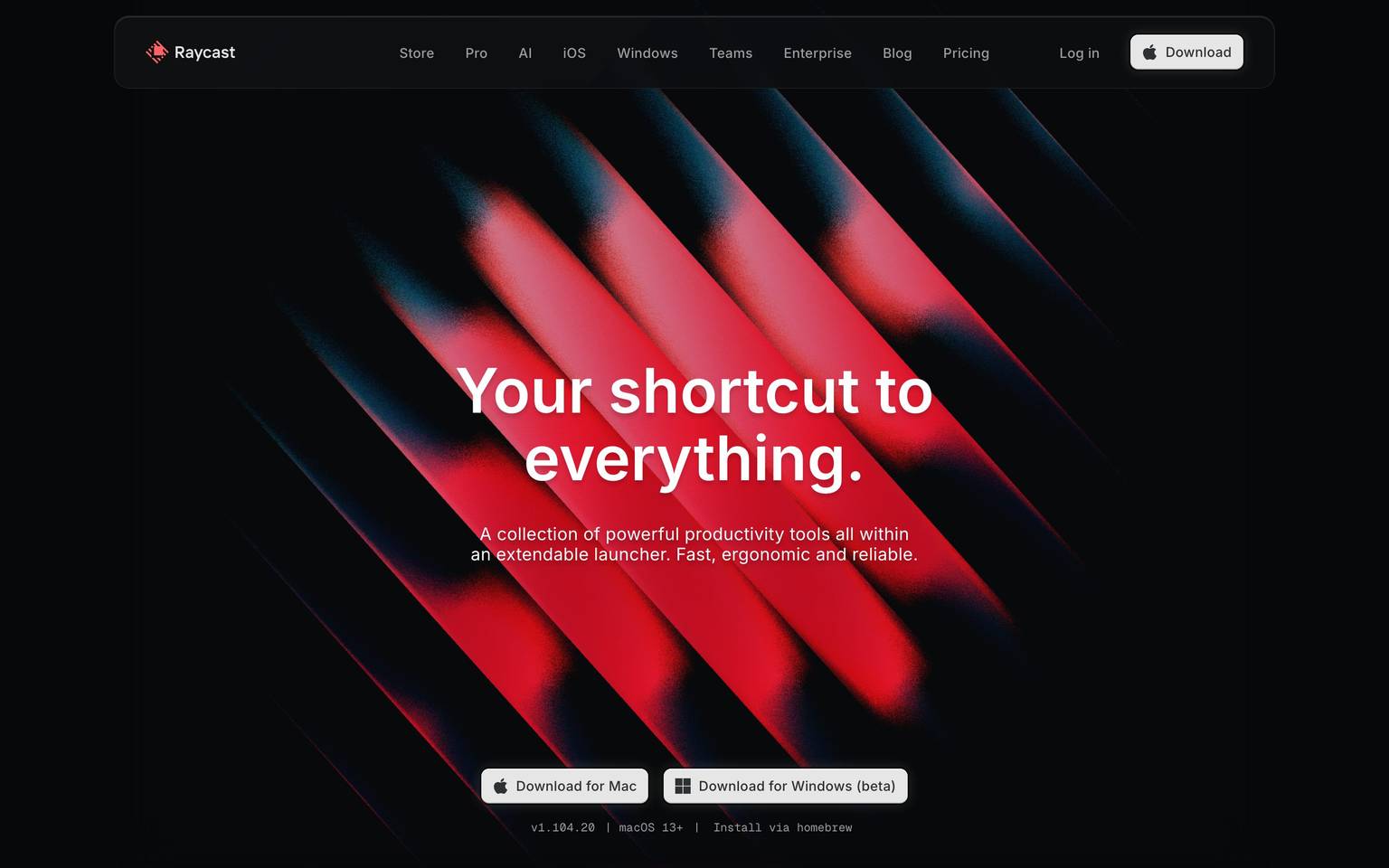
A dark, macOS-launcher-native marketing interface anchored on near-black canvas (#07080a) with a single off-white primary button and a signature red gradient hero. The system reads as precise developer-tool software — Inter throughout, heavily layered inset/outset box-shadows that mimic native macOS controls, soft-rounded cards (~20px), and a monochrome UI broken only by Raycast's red brand spectrum. Voltage comes from the red gradient artwork and from the meticulously shadowed control surfaces, not from accent color usage.
Works withClaude CodeCursorCodexGemini CLICopilotv0LovableBoltWindsurfReplit
---
version: alpha
name: Raycast-design-analysis
description: A dark, macOS-launcher-native marketing interface anchored on near-black canvas (#07080a) with a single off-white primary button and a signature red gradient hero. The system reads as precise developer-tool software — Inter throughout, heavily layered inset/outset box-shadows that mimic native macOS controls, soft-rounded cards (~20px), and a monochrome UI broken only by Raycast's red brand spectrum. Voltage comes from the red gradient artwork and from the meticulously shadowed control surfaces, not from accent color usage.
colors:
  ink: "#ffffff"
  muted: "#6a6b6c"
  link: "#9c9c9d"
  hairline: "#434345"
  neutral-strong: "#d9d9d9"
  primary: "#e6e6e6"
  on-primary: "#2f3031"
  surface-input: "#ffffff"
  canvas: "#07080a"
  canvas-deep: "#08090c"
  canvas-raised: "#0c0d0f"
  canvas-elevated: "#111214"
  pure-black: "#000000"
  brand-red: "#ff6363"
  brand-red-deep: "#ff2136"
  brand-red-shadow: "#452324"
  brand-red-shadow-soft: "#2c1617"
  brand-red-mid: "#833637"
  accent-blue: "#0294fe"
  accent-sky: "#56c2ff"
  accent-green: "#59d499"
typography:
  display:
    fontFamily: "Inter, sans-serif"
    fontSize: 64px
    fontWeight: 600
    lineHeight: 1.1
    letterSpacing: 0
  title:
    fontFamily: "Inter, sans-serif"
    fontSize: 24px
    fontWeight: 500
    lineHeight: 1.6
    letterSpacing: 0.2px
  button:
    fontFamily: "Inter, sans-serif"
    fontSize: 14px
    fontWeight: 500
    lineHeight: 1.143
    letterSpacing: 0.2px
rounded:
  xxs: 2px
  xs: 4px
  sm: 6px
  md: 8px
  lg: 11px
  xl: 12px
  xxl: 16px
  xxxl: 20px
spacing:
  xxs: 4px
  xs: 8px
  sm: 12px
  md: 14px
  lg: 16px
  xl: 24px
  xxl: 32px
components:
  button-primary:
    backgroundColor: "{colors.primary}"
    textColor: "{colors.on-primary}"
    typography: "{typography.button}"
    rounded: "{rounded.md}"
    padding: 8px 12px
  download-button:
    backgroundColor: "{colors.primary}"
    textColor: "{colors.on-primary}"
    typography: "{typography.button}"
    rounded: "{rounded.md}"
    padding: 8px 12px
  top-nav:
    backgroundColor: "{colors.canvas-raised}"
    textColor: "{colors.ink}"
    typography: "{typography.button}"
    rounded: "{rounded.xxl}"
  nav-link:
    backgroundColor: transparent
    textColor: "{colors.link}"
    typography: "{typography.button}"
  card:
    backgroundColor: "{colors.canvas-raised}"
    textColor: "{colors.ink}"
    rounded: "{rounded.xxxl}"
  input:
    backgroundColor: "{colors.surface-input}"
    textColor: "{colors.on-primary}"
    typography: "{typography.button}"
    rounded: "{rounded.md}"
---

## Overview

Raycast's marketing surface is a dark, developer-tool-native interface — near-black canvas (`{colors.canvas}` — #07080a) carrying a single off-white primary button (`{colors.primary}` — #e6e6e6 with `{colors.on-primary}` — #2f3031 text) and a dominant red gradient hero. The system reads as precise, engineered, and macOS-adjacent: every control surface mimics the layered light/shadow of native macOS UI, type is Inter throughout, and the only chromatic break in the otherwise-monochrome interface is Raycast's red brand spectrum (`{colors.brand-red}` — #ff6363) used in the hero artwork and logo.

The type system is minimal and measured: **Inter** at three observed roles — a 64px / weight 600 display headline ("Your shortcut to everything."), a 24px / weight 500 title, and a 14px / weight 500 button label. There is no second typeface; the whole system runs on Inter, which keeps the voice tightly utilitarian.

Component voltage comes from **box-shadow craft**, not color. Raycast's buttons, cards, and control chips use stacked inset-and-outset shadows (often four or five layers) to simulate the physically-lit surfaces of native macOS controls — a 1px white inset highlight on top, a dark inset at the bottom, a tight outline ring, and a soft drop. The result reads as "real software chrome" rather than flat web styling.

**Key Characteristics:**
- Near-black canvas (`{colors.canvas}` — #07080a) with stepped dark surfaces above it (`{colors.canvas-deep}` #08090c, `{colors.canvas-raised}` #0c0d0f, `{colors.canvas-elevated}` #111214).
- Single off-white primary button (`{colors.primary}` — #e6e6e6) with dark `{colors.on-primary}` (#2f3031) label, `{rounded.md}` (8px), padding 8px × 12px. The same treatment serves "Download" in the nav and the two hero download buttons.
- Inter everywhere — display (64px/600), title (24px/500), button (14px/500). No second family.
- Red brand spectrum reserved for the hero gradient artwork and logo: `{colors.brand-red}` (#ff6363), `{colors.brand-red-deep}` (#ff2136), and shadow-toned reds (`{colors.brand-red-shadow}` #452324, `{colors.brand-red-shadow-soft}` #2c1617, `{colors.brand-red-mid}` #833637).
- Heavily layered box-shadows on every control — inset highlights + dark inset + outline ring + drop shadow — emulating native macOS surfaces.
- Soft-rounded cards at `{rounded.xxxl}` (20px); controls and inputs at `{rounded.md}` (8px); pill-rounded nav container at `{rounded.xxl}` (16px).
- Muted link/label grays (`{colors.muted}` #6a6b6c, `{colors.link}` #9c9c9d) carry secondary text against the dark canvas.

## Colors

### Brand & Accent
- **Brand Red** (`{colors.brand-red}` — #ff6363): The primary brand hue — the logo and the lightest band of the hero gradient.
- **Brand Red Deep** (`{colors.brand-red-deep}` — #ff2136): The saturated core of the hero gradient.
- **Brand Red Shadow / Soft / Mid** (`{colors.brand-red-shadow}` — #452324, `{colors.brand-red-shadow-soft}` — #2c1617, `{colors.brand-red-mid}` — #833637): The darker reds where the gradient falls into the black canvas — used only inside the hero artwork, never as interface fills.
- **Accent Blue / Sky / Green** (`{colors.accent-blue}` — #0294fe, `{colors.accent-sky}` — #56c2ff, `{colors.accent-green}` — #59d499): Low-frequency accents (measured 7–10 occurrences each), appearing in product-UI fragments and icon glyphs rather than on marketing chrome.

### Surface
- **Canvas** (`{colors.canvas}` — #07080a): The default page floor — near-black.
- **Canvas Deep** (`{colors.canvas-deep}` — #08090c): A barely-distinct deeper tone used in stacked sections.
- **Canvas Raised** (`{colors.canvas-raised}` — #0c0d0f): The raised-surface tone for the nav container and cards.
- **Canvas Elevated** (`{colors.canvas-elevated}` — #111214): The top of the surface stack — elevated panels and chips.
- **Pure Black** (`{colors.pure-black}` — #000000): Used inside shadow rings and gradient edges.
- **Surface Input** (`{colors.surface-input}` — #ffffff): Measured input background — white, an inversion against the dark canvas.

### Action
- **Primary** (`{colors.primary}` — #e6e6e6): The single off-white button fill for all primary CTAs.
- **On Primary** (`{colors.on-primary}` — #2f3031): The dark label text on the primary button.
- **Neutral Strong** (`{colors.neutral-strong}` — #d9d9d9): A secondary near-white used on control surfaces and chip fills.

### Text
- **Ink** (`{colors.ink}` — #ffffff): All headlines and primary text — white on the dark canvas, the highest-frequency color (measured 2384).
- **Muted** (`{colors.muted}` — #6a6b6c): Secondary text and fine-print.
- **Link** (`{colors.link}` — #9c9c9d): Nav links and inline links — a light gray.
- **Hairline** (`{colors.hairline}` — #434345): The border / divider tone on dark surfaces.

## Typography

### Font Family
The system runs **Inter** for everything — display headlines, titles, and button labels. No second typeface was measured. Inter is open-source (SIL OFL), so the system ships exactly what it specifies; no substitute is required. The recommended fallback stack is `Inter, -apple-system, BlinkMacSystemFont, "Segoe UI", Roboto, sans-serif`.

### Hierarchy

| Token | Size | Weight | Line Height | Letter Spacing | Use |
|---|---|---|---|---|---|
| `{typography.display}` | 64px | 600 | 1.1 | 0 (measured "normal") | Hero h1 ("Your shortcut to everything.") |
| `{typography.title}` | 24px | 500 | 1.6 | 0.2px | Section sub-heads / h4-level titles |
| `{typography.button}` | 14px | 500 | 1.143 | 0.2px | Button labels, nav links |

### Principles
The voice is utilitarian and tight: a single family across all roles, mid-weights (500–600, never 700), and small positive tracking (0.2px) on the smaller roles. The display headline runs weight 600 with default ("normal") tracking — Raycast does not apply the negative letter-spacing common to other display systems; the headline is measured at `letter_spacing: normal`, rendered here as 0.

### Note on Font Substitutes
No licensed/custom typefaces were flagged (`fonts_licensed: []`). Inter is freely available, so no substitute is needed. If Inter must be swapped, **Roboto** or system-ui at matching weights preserves the neutral, geometric-humanist character.

## Layout

### Spacing System
- **Base unit:** ~4px, though the system's most frequent steps are 8px (measured 275×), 14px (159×) and 15px (159×), and 24px (150×).
- **Tokens:** `{spacing.xxs}` 4px · `{spacing.xs}` 8px · `{spacing.sm}` 12px · `{spacing.md}` 14px · `{spacing.lg}` 16px · `{spacing.xl}` 24px · `{spacing.xxl}` 32px.
- **Control padding:** the primary button measures 8px × 12px (`{spacing.xs}` × `{spacing.sm}`).
- **Section / card gutters:** 16px and 24px dominate the larger rhythm.

The 14/15px pair appearing at near-identical high frequency suggests a consistent ~14px micro-rhythm inside control rows (icon-to-label gaps, chip padding). Larger editorial band spacing was not isolated in the measurement — see Known Gaps.

### Grid & Container
- The top nav is a centered rounded container floating above the hero (visible in the landing screenshot), with the logo at left, a horizontal menu (Store, Pro, AI, iOS, Windows, Teams, Developers, Blog, Pricing) center, and "Log in" + "Download" at right.
- The hero centers a single display headline + supporting sub-copy + two download buttons over full-bleed red gradient artwork.
- Detailed column counts and max content width were not measured — see Known Gaps.

### Whitespace Philosophy
The hero is intentionally airy — a single large headline floats in a tall red-gradient field with generous vertical breathing room above the download buttons. The interface is sparse and focused: one primary action per band.

## Elevation & Depth

Raycast's depth language is its signature. Instead of flat web cards, controls carry **stacked multi-layer box-shadows** that emulate physically-lit native macOS surfaces. The measured shadows:

| Treatment | Measured value (abbreviated) | Use |
|---|---|---|
| Native control (high-freq, 159×) | `rgba(0,0,0,0.4) 0 1.5px 0.5px 2.5px, rgb(0,0,0) 0 0 0.5px 1px, rgba(0,0,0,0.25) 0 2px 1px 1px inset, rgba(255,255,255,0.2) 0 1px 1px 1px inset …` | Buttons / chips — outset drop + outline ring + dark inset bottom + white inset top |
| Outline ring (54×) | `rgb(27,28,30) 0 0 0 1px, rgb(7,8,10) 0 0 0 1px inset` | Hairline ring on dark panels |
| Warm glow (18×) | `rgba(215,201,175,0.05) 0 0 20px 5px, rgba(215,201,175,0.05) 0 0 16px -7px` | Soft ambient glow around feature surfaces |
| Soft drop (17×) | `rgba(0,0,0,0.28) 0 1.189px 2.377px` | Small floating elements |
| Beveled chip (17×) | `rgba(255,255,255,0.05) 0 1px 0 inset, rgba(255,255,255,0.25) 0 0 0 1px, rgba(0,0,0,0.2) 0 -1px 0 inset` | Pressed/segmented chips |
| Focus halo (7×) | `rgba(0,0,0,0.5) 0 0 0 2px, rgba(255,255,255,0.19) 0 0 14px, … inset highlights` | Focused control |
| Card (measured on card) | `rgba(255,255,255,0.1) 0 1px 0 inset, rgba(7,13,79,0.05) 0 0 20px 3px, rgba(7,13,79,0.05) 0 0 40px 20px, rgba(255,255,255,0.06) 0 0 0 1px inset` | Card surface — inset top highlight + soft blue-black bloom + inset hairline ring |

The philosophy is **simulated physical lighting**: a 1px white inset along the top edge reads as a highlight, a dark inset along the bottom reads as a recessed shadow, and a tight 1px ring defines the silhouette against the dark canvas. This is what makes Raycast's web controls feel like the native app.

### Decorative Depth
- The hero's red gradient artwork is the dominant decorative layer — diagonal red bands fading into black, carrying the full red spectrum (`{colors.brand-red}` → `{colors.brand-red-deep}` → `{colors.brand-red-shadow}`).
- The warm glow shadow (`rgba(215,201,175,0.05)`) adds subtle ambient lighting around feature surfaces.

## Shapes

### Border Radius Scale

| Token | Value | Use |
|---|---|---|
| `{rounded.xxs}` | 2px | Tiny inner accents (measured 11×) |
| `{rounded.xs}` | 4px | Small chips, inner elements (17×) |
| `{rounded.sm}` | 6px | Compact controls (63×) |
| `{rounded.md}` | 8px | Primary buttons, inputs (109× — dominant control radius) |
| `{rounded.lg}` | 11px | High-frequency control surfaces (159×) |
| `{rounded.xl}` | 12px | Mid-size panels (55×) |
| `{rounded.xxl}` | 16px | Nav container, larger panels (29×) |
| `{rounded.xxxl}` | 20px | Cards (35×) |

The two most-used radii are `{rounded.lg}` (11px, 159×) and `{rounded.md}` (8px, 109×) — the system's control surfaces cluster around 8–11px, while cards step up to 20px.

### Photography / Artwork Geometry
The hero artwork is a full-bleed red gradient; product-UI fragments and cards adopt the `{rounded.xxxl}` (20px) card corners. Larger one-off radii (31px, 36px, 43px) appear once each — likely pill-rounded badges or circular avatars, not part of the core scale.

## Components

### Navigation

**`top-nav`** — A floating rounded container above the hero. Background `{colors.canvas-raised}` (#0c0d0f), rounded `{rounded.xxl}` (16px, derived from the nav silhouette in the screenshot matched to the measured 16px radius). Holds the Raycast logo + wordmark at left, a horizontal menu center, and "Log in" + "Download" at right.

**`nav-link`** — Inline menu items in `{colors.link}` (#9c9c9d), type `{typography.button}` (Inter 14px / 500). No background.

### Buttons

**`button-primary`** — The single primary CTA style. Background `{colors.primary}` (#e6e6e6), label `{colors.on-primary}` (#2f3031), type `{typography.button}` (Inter 14px / 500), rounded `{rounded.md}` (8px), padding 8px × 12px. Carries the signature stacked native-control box-shadow (white inset top highlight + dark inset bottom + outline ring + soft drop).

**`download-button`** — The hero's "Download for Mac" / "Download for Windows (beta)" buttons and the nav "Download" share the `button-primary` treatment — off-white fill, dark label, leading platform glyph, `{rounded.md}`, 8px × 12px padding.

### Containers

**`card`** — Soft-rounded surface at `{rounded.xxxl}` (20px). Background `{colors.canvas-raised}` (#0c0d0f, derived — card background was not directly measured; the card's measured spec captured only radius + shadow). Carries the layered card shadow: 1px white inset top highlight, a soft blue-black bloom (`rgba(7,13,79,0.05)` at 20px and 40px spreads), and a 1px inset hairline ring (`rgba(255,255,255,0.06)`).

### Inputs

**`input`** — Text input with measured white background `{colors.surface-input}` (#ffffff) and `{rounded.md}` (8px) corners. Label/value text in `{colors.on-primary}` for legibility on the white fill. The white input inverts against the dark canvas.

## Do's and Don'ts

### Do
- Keep the canvas near-black (`{colors.canvas}` — #07080a) and step surfaces up through `{colors.canvas-deep}` → `{colors.canvas-raised}` → `{colors.canvas-elevated}` for layering.
- Use the single off-white `{colors.primary}` button for all primary actions — Raycast has exactly one button treatment.
- Apply the layered native-control box-shadows to interactive surfaces — the white-inset-top + dark-inset-bottom + outline-ring combination is the brand's depth signature.
- Reserve the red spectrum for the hero gradient artwork and logo. The interface stays monochrome.
- Run Inter at the three measured roles; keep weights at 500–600.
- Use `{rounded.md}` (8px) for controls and inputs, `{rounded.xxxl}` (20px) for cards.

### Don't
- Don't introduce a second typeface — the system is Inter-only.
- Don't fill buttons or chips with red; the red is artwork, not an action color.
- Don't flatten the controls — removing the inset/outset shadow layers strips the native-macOS character.
- Don't apply heavy negative letter-spacing to the display headline; it was measured at default tracking.
- Don't use the bright accent blue/sky/green outside product-UI fragments — they are scarce, low-frequency glyph accents.
- Don't document hover states — default and active/pressed only.

## Responsive Behavior

Responsive breakpoints were not captured in the measurement (only desktop landing + pricing were rendered). The following is the conventional collapse pattern for this layout and should be confirmed against live rendering:

| Name | Width | Likely Changes |
|---|---|---|
| Mobile | < 768px | Floating nav collapses to a compact bar / menu; hero display drops from 64px; download buttons stack vertically |
| Tablet | 768–1024px | Nav menu tightens; hero stays centered |
| Desktop | > 1024px | Full floating nav with all menu items; centered hero over full-bleed gradient |

### Touch Targets
- `{component.button-primary}` measures 8px × 12px padding around a 14px label — confirm the resulting tap area meets a 44px minimum on touch devices (the measured padding alone yields a sub-44px control).

### Collapsing Strategy
- Not measured — see Known Gaps. The floating rounded nav (`{component.top-nav}`) and the centered hero are the only layout structures confirmed from screenshots.

## Iteration Guide

1. Focus on ONE component at a time. Reference its YAML key directly (`{component.button-primary}`, `{component.card}`).
2. Variants live as separate entries in `components:` (`-active`, `-disabled`, etc.).
3. Use `{token.refs}` everywhere — never inline a hex in a component.
4. Never document hover. Default and active/pressed only.
5. Inter is the only family — do not introduce a second typeface.
6. The red spectrum is artwork; keep the interface monochrome.
7. Preserve the layered box-shadow depth model — it is the brand's defining visual signature.

## Known Gaps

- **Card background** was not directly measured — only the card's radius and shadow were captured. The `{colors.canvas-raised}` fill assigned to `{component.card}` is derived from the surface stack and should be confirmed.
- **Body / paragraph typography** was not isolated — only display (64px), title (24px), and button (14px) roles were measured. The hero sub-copy and running text sizes/weights are unknown.
- **Section / band spacing** (vertical rhythm between editorial sections) was not extracted; the spacing tokens reflect control-level padding/gap/margin frequencies. The 14px vs 15px pair at identical frequency may be sub-pixel rounding of a single value.
- **Responsive breakpoints and grid/container widths** were not captured — only desktop landing + pricing pages were rendered.
- **Hover, focus, disabled, and pressed states** beyond the measured focus-halo shadow are not documented per scope.
- **Accent blue/sky/green usage** is inferred to be product-UI / icon glyphs based on low frequency (7–10 each); exact placement was not isolated.
- **Pricing page components** (tier cards, feature tables) were captured as a page but not separated into distinct component specs.
- **Animation and transition timings** are out of scope.

<!-- Documented by Duply · real-world design systems as ready-to-use DESIGN.md for AI coding agents · https://duply.ai/raycast/design-md -->
Color Palette
Accent
Neutrals
Typography
display64px · 600 · 1.1
The quick brown fox jumpstitle24px · 500 · 1.6
The quick brown fox jumpsbutton14px · 500 · 1.143
The quick brown fox jumpsSpacing & Shape
Spacing
| Name | Value | Preview |
|---|---|---|
| xxs | 4px | |
| xs | 8px | |
| sm | 12px | |
| md | 14px | |
| lg | 16px | |
| xl | 24px | |
| xxl | 32px |
Border Radius
| Name | Value | Preview |
|---|---|---|
| xxs | 2px | |
| xs | 4px | |
| sm | 6px | |
| md | 8px | |
| lg | 11px | |
| xl | 12px | |
| xxl | 16px | |
| xxxl | 20px |
FAQ
- What colors does Raycast use?
- Raycast's core palette includes #ffffff, #6a6b6c, #9c9c9d, #434345, #d9d9d9. The full color set with usage roles (canvas, ink, surfaces, accent, semantic) is documented in the Raycast DESIGN.md.
- What font does Raycast use?
- Raycast's primary typeface is Inter. The complete type scale (sizes, weights, line-height and letter-spacing per role), with an open substitute where the original is licensed, is documented in the DESIGN.md.
- What is the Raycast design system?
- A dark, macOS-launcher-native marketing interface anchored on near-black canvas (#07080a) with a single off-white primary button and a signature red gradient hero. The system reads as precise developer-tool software — Inter throughout, heavily layered inset/outset box-shadows that mimic native
Get this as a working kit
Raycast Launch Kit + DESIGN.md
$299$225
One-time payment
- A complete production-stack template, styled like Raycast, fully built and wired.
- One-time payment and the codebase is yours. No platform fees, no subscription.
Open it with Claude Code, Cursor, or any coding agent and build in plain language, then ship a complete web app.
- Your private DESIGN.md
- Marketing pages, blog, SEO & legal
- Email capture, newsletter & contact
- Accept payments (Stripe)
- Analytics (GA4 + PostHog)
- One-click deploy
- Auth, login & roles
- A full app dashboard, when you grow
More like this
---
version: alpha
name: Raycast-design-analysis
description: A dark, macOS-launcher-native marketing interface anchored on near-black canvas (#07080a) with a single off-white primary button and a signature red gradient hero. The system reads as precise developer-tool software — Inter throughout, heavily layered inset/outset box-shadows that mimic native macOS controls, soft-rounded cards (~20px), and a monochrome UI broken only by Raycast's red brand spectrum. Voltage comes from the red gradient artwork and from the meticulously shadowed control surfaces, not from accent color usage.
colors:
  ink: "#ffffff"
  muted: "#6a6b6c"
  link: "#9c9c9d"
  hairline: "#434345"
  neutral-strong: "#d9d9d9"
  primary: "#e6e6e6"
  on-primary: "#2f3031"
  surface-input: "#ffffff"
  canvas: "#07080a"
  canvas-deep: "#08090c"
  canvas-raised: "#0c0d0f"
  canvas-elevated: "#111214"
  pure-black: "#000000"
  brand-red: "#ff6363"
  brand-red-deep: "#ff2136"
  brand-red-shadow: "#452324"
  brand-red-shadow-soft: "#2c1617"
  brand-red-mid: "#833637"
  accent-blue: "#0294fe"
  accent-sky: "#56c2ff"
  accent-green: "#59d499"
typography:
  display:
    fontFamily: "Inter, sans-serif"
    fontSize: 64px
    fontWeight: 600
    lineHeight: 1.1
    letterSpacing: 0
  title:
    fontFamily: "Inter, sans-serif"
    fontSize: 24px
    fontWeight: 500
    lineHeight: 1.6
    letterSpacing: 0.2px
  button:
    fontFamily: "Inter, sans-serif"
    fontSize: 14px
    fontWeight: 500
    lineHeight: 1.143
    letterSpacing: 0.2px
rounded:
  xxs: 2px
  xs: 4px
  sm: 6px
  md: 8px
  lg: 11px
  xl: 12px
  xxl: 16px
  xxxl: 20px
spacing:
  xxs: 4px
  xs: 8px
  sm: 12px
  md: 14px
  lg: 16px
  xl: 24px
  xxl: 32px
components:
  button-primary:
    backgroundColor: "{colors.primary}"
    textColor: "{colors.on-primary}"
    typography: "{typography.button}"
    rounded: "{rounded.md}"
    padding: 8px 12px
  download-button:
    backgroundColor: "{colors.primary}"
    textColor: "{colors.on-primary}"
    typography: "{typography.button}"
    rounded: "{rounded.md}"
    padding: 8px 12px
  top-nav:
    backgroundColor: "{colors.canvas-raised}"
    textColor: "{colors.ink}"
    typography: "{typography.button}"
    rounded: "{rounded.xxl}"
  nav-link:
    backgroundColor: transparent
    textColor: "{colors.link}"
    typography: "{typography.button}"
  card:
    backgroundColor: "{colors.canvas-raised}"
    textColor: "{colors.ink}"
    rounded: "{rounded.xxxl}"
  input:
    backgroundColor: "{colors.surface-input}"
    textColor: "{colors.on-primary}"
    typography: "{typography.button}"
    rounded: "{rounded.md}"
---

## Overview

Raycast's marketing surface is a dark, developer-tool-native interface — near-black canvas (`{colors.canvas}` — #07080a) carrying a single off-white primary button (`{colors.primary}` — #e6e6e6 with `{colors.on-primary}` — #2f3031 text) and a dominant red gradient hero. The system reads as precise, engineered, and macOS-adjacent: every control surface mimics the layered light/shadow of native macOS UI, type is Inter throughout, and the only chromatic break in the otherwise-monochrome interface is Raycast's red brand spectrum (`{colors.brand-red}` — #ff6363) used in the hero artwork and logo.

The type system is minimal and measured: **Inter** at three observed roles — a 64px / weight 600 display headline ("Your shortcut to everything."), a 24px / weight 500 title, and a 14px / weight 500 button label. There is no second typeface; the whole system runs on Inter, which keeps the voice tightly utilitarian.

Component voltage comes from **box-shadow craft**, not color. Raycast's buttons, cards, and control chips use stacked inset-and-outset shadows (often four or five layers) to simulate the physically-lit surfaces of native macOS controls — a 1px white inset highlight on top, a dark inset at the bottom, a tight outline ring, and a soft drop. The result reads as "real software chrome" rather than flat web styling.

**Key Characteristics:**
- Near-black canvas (`{colors.canvas}` — #07080a) with stepped dark surfaces above it (`{colors.canvas-deep}` #08090c, `{colors.canvas-raised}` #0c0d0f, `{colors.canvas-elevated}` #111214).
- Single off-white primary button (`{colors.primary}` — #e6e6e6) with dark `{colors.on-primary}` (#2f3031) label, `{rounded.md}` (8px), padding 8px × 12px. The same treatment serves "Download" in the nav and the two hero download buttons.
- Inter everywhere — display (64px/600), title (24px/500), button (14px/500). No second family.
- Red brand spectrum reserved for the hero gradient artwork and logo: `{colors.brand-red}` (#ff6363), `{colors.brand-red-deep}` (#ff2136), and shadow-toned reds (`{colors.brand-red-shadow}` #452324, `{colors.brand-red-shadow-soft}` #2c1617, `{colors.brand-red-mid}` #833637).
- Heavily layered box-shadows on every control — inset highlights + dark inset + outline ring + drop shadow — emulating native macOS surfaces.
- Soft-rounded cards at `{rounded.xxxl}` (20px); controls and inputs at `{rounded.md}` (8px); pill-rounded nav container at `{rounded.xxl}` (16px).
- Muted link/label grays (`{colors.muted}` #6a6b6c, `{colors.link}` #9c9c9d) carry secondary text against the dark canvas.

## Colors

### Brand & Accent
- **Brand Red** (`{colors.brand-red}` — #ff6363): The primary brand hue — the logo and the lightest band of the hero gradient.
- **Brand Red Deep** (`{colors.brand-red-deep}` — #ff2136): The saturated core of the hero gradient.
- **Brand Red Shadow / Soft / Mid** (`{colors.brand-red-shadow}` — #452324, `{colors.brand-red-shadow-soft}` — #2c1617, `{colors.brand-red-mid}` — #833637): The darker reds where the gradient falls into the black canvas — used only inside the hero artwork, never as interface fills.
- **Accent Blue / Sky / Green** (`{colors.accent-blue}` — #0294fe, `{colors.accent-sky}` — #56c2ff, `{colors.accent-green}` — #59d499): Low-frequency accents (measured 7–10 occurrences each), appearing in product-UI fragments and icon glyphs rather than on marketing chrome.

### Surface
- **Canvas** (`{colors.canvas}` — #07080a): The default page floor — near-black.
- **Canvas Deep** (`{colors.canvas-deep}` — #08090c): A barely-distinct deeper tone used in stacked sections.
- **Canvas Raised** (`{colors.canvas-raised}` — #0c0d0f): The raised-surface tone for the nav container and cards.
- **Canvas Elevated** (`{colors.canvas-elevated}` — #111214): The top of the surface stack — elevated panels and chips.
- **Pure Black** (`{colors.pure-black}` — #000000): Used inside shadow rings and gradient edges.
- **Surface Input** (`{colors.surface-input}` — #ffffff): Measured input background — white, an inversion against the dark canvas.

### Action
- **Primary** (`{colors.primary}` — #e6e6e6): The single off-white button fill for all primary CTAs.
- **On Primary** (`{colors.on-primary}` — #2f3031): The dark label text on the primary button.
- **Neutral Strong** (`{colors.neutral-strong}` — #d9d9d9): A secondary near-white used on control surfaces and chip fills.

### Text
- **Ink** (`{colors.ink}` — #ffffff): All headlines and primary text — white on the dark canvas, the highest-frequency color (measured 2384).
- **Muted** (`{colors.muted}` — #6a6b6c): Secondary text and fine-print.
- **Link** (`{colors.link}` — #9c9c9d): Nav links and inline links — a light gray.
- **Hairline** (`{colors.hairline}` — #434345): The border / divider tone on dark surfaces.

## Typography

### Font Family
The system runs **Inter** for everything — display headlines, titles, and button labels. No second typeface was measured. Inter is open-source (SIL OFL), so the system ships exactly what it specifies; no substitute is required. The recommended fallback stack is `Inter, -apple-system, BlinkMacSystemFont, "Segoe UI", Roboto, sans-serif`.

### Hierarchy

| Token | Size | Weight | Line Height | Letter Spacing | Use |
|---|---|---|---|---|---|
| `{typography.display}` | 64px | 600 | 1.1 | 0 (measured "normal") | Hero h1 ("Your shortcut to everything.") |
| `{typography.title}` | 24px | 500 | 1.6 | 0.2px | Section sub-heads / h4-level titles |
| `{typography.button}` | 14px | 500 | 1.143 | 0.2px | Button labels, nav links |

### Principles
The voice is utilitarian and tight: a single family across all roles, mid-weights (500–600, never 700), and small positive tracking (0.2px) on the smaller roles. The display headline runs weight 600 with default ("normal") tracking — Raycast does not apply the negative letter-spacing common to other display systems; the headline is measured at `letter_spacing: normal`, rendered here as 0.

### Note on Font Substitutes
No licensed/custom typefaces were flagged (`fonts_licensed: []`). Inter is freely available, so no substitute is needed. If Inter must be swapped, **Roboto** or system-ui at matching weights preserves the neutral, geometric-humanist character.

## Layout

### Spacing System
- **Base unit:** ~4px, though the system's most frequent steps are 8px (measured 275×), 14px (159×) and 15px (159×), and 24px (150×).
- **Tokens:** `{spacing.xxs}` 4px · `{spacing.xs}` 8px · `{spacing.sm}` 12px · `{spacing.md}` 14px · `{spacing.lg}` 16px · `{spacing.xl}` 24px · `{spacing.xxl}` 32px.
- **Control padding:** the primary button measures 8px × 12px (`{spacing.xs}` × `{spacing.sm}`).
- **Section / card gutters:** 16px and 24px dominate the larger rhythm.

The 14/15px pair appearing at near-identical high frequency suggests a consistent ~14px micro-rhythm inside control rows (icon-to-label gaps, chip padding). Larger editorial band spacing was not isolated in the measurement — see Known Gaps.

### Grid & Container
- The top nav is a centered rounded container floating above the hero (visible in the landing screenshot), with the logo at left, a horizontal menu (Store, Pro, AI, iOS, Windows, Teams, Developers, Blog, Pricing) center, and "Log in" + "Download" at right.
- The hero centers a single display headline + supporting sub-copy + two download buttons over full-bleed red gradient artwork.
- Detailed column counts and max content width were not measured — see Known Gaps.

### Whitespace Philosophy
The hero is intentionally airy — a single large headline floats in a tall red-gradient field with generous vertical breathing room above the download buttons. The interface is sparse and focused: one primary action per band.

## Elevation & Depth

Raycast's depth language is its signature. Instead of flat web cards, controls carry **stacked multi-layer box-shadows** that emulate physically-lit native macOS surfaces. The measured shadows:

| Treatment | Measured value (abbreviated) | Use |
|---|---|---|
| Native control (high-freq, 159×) | `rgba(0,0,0,0.4) 0 1.5px 0.5px 2.5px, rgb(0,0,0) 0 0 0.5px 1px, rgba(0,0,0,0.25) 0 2px 1px 1px inset, rgba(255,255,255,0.2) 0 1px 1px 1px inset …` | Buttons / chips — outset drop + outline ring + dark inset bottom + white inset top |
| Outline ring (54×) | `rgb(27,28,30) 0 0 0 1px, rgb(7,8,10) 0 0 0 1px inset` | Hairline ring on dark panels |
| Warm glow (18×) | `rgba(215,201,175,0.05) 0 0 20px 5px, rgba(215,201,175,0.05) 0 0 16px -7px` | Soft ambient glow around feature surfaces |
| Soft drop (17×) | `rgba(0,0,0,0.28) 0 1.189px 2.377px` | Small floating elements |
| Beveled chip (17×) | `rgba(255,255,255,0.05) 0 1px 0 inset, rgba(255,255,255,0.25) 0 0 0 1px, rgba(0,0,0,0.2) 0 -1px 0 inset` | Pressed/segmented chips |
| Focus halo (7×) | `rgba(0,0,0,0.5) 0 0 0 2px, rgba(255,255,255,0.19) 0 0 14px, … inset highlights` | Focused control |
| Card (measured on card) | `rgba(255,255,255,0.1) 0 1px 0 inset, rgba(7,13,79,0.05) 0 0 20px 3px, rgba(7,13,79,0.05) 0 0 40px 20px, rgba(255,255,255,0.06) 0 0 0 1px inset` | Card surface — inset top highlight + soft blue-black bloom + inset hairline ring |

The philosophy is **simulated physical lighting**: a 1px white inset along the top edge reads as a highlight, a dark inset along the bottom reads as a recessed shadow, and a tight 1px ring defines the silhouette against the dark canvas. This is what makes Raycast's web controls feel like the native app.

### Decorative Depth
- The hero's red gradient artwork is the dominant decorative layer — diagonal red bands fading into black, carrying the full red spectrum (`{colors.brand-red}` → `{colors.brand-red-deep}` → `{colors.brand-red-shadow}`).
- The warm glow shadow (`rgba(215,201,175,0.05)`) adds subtle ambient lighting around feature surfaces.

## Shapes

### Border Radius Scale

| Token | Value | Use |
|---|---|---|
| `{rounded.xxs}` | 2px | Tiny inner accents (measured 11×) |
| `{rounded.xs}` | 4px | Small chips, inner elements (17×) |
| `{rounded.sm}` | 6px | Compact controls (63×) |
| `{rounded.md}` | 8px | Primary buttons, inputs (109× — dominant control radius) |
| `{rounded.lg}` | 11px | High-frequency control surfaces (159×) |
| `{rounded.xl}` | 12px | Mid-size panels (55×) |
| `{rounded.xxl}` | 16px | Nav container, larger panels (29×) |
| `{rounded.xxxl}` | 20px | Cards (35×) |

The two most-used radii are `{rounded.lg}` (11px, 159×) and `{rounded.md}` (8px, 109×) — the system's control surfaces cluster around 8–11px, while cards step up to 20px.

### Photography / Artwork Geometry
The hero artwork is a full-bleed red gradient; product-UI fragments and cards adopt the `{rounded.xxxl}` (20px) card corners. Larger one-off radii (31px, 36px, 43px) appear once each — likely pill-rounded badges or circular avatars, not part of the core scale.

## Components

### Navigation

**`top-nav`** — A floating rounded container above the hero. Background `{colors.canvas-raised}` (#0c0d0f), rounded `{rounded.xxl}` (16px, derived from the nav silhouette in the screenshot matched to the measured 16px radius). Holds the Raycast logo + wordmark at left, a horizontal menu center, and "Log in" + "Download" at right.

**`nav-link`** — Inline menu items in `{colors.link}` (#9c9c9d), type `{typography.button}` (Inter 14px / 500). No background.

### Buttons

**`button-primary`** — The single primary CTA style. Background `{colors.primary}` (#e6e6e6), label `{colors.on-primary}` (#2f3031), type `{typography.button}` (Inter 14px / 500), rounded `{rounded.md}` (8px), padding 8px × 12px. Carries the signature stacked native-control box-shadow (white inset top highlight + dark inset bottom + outline ring + soft drop).

**`download-button`** — The hero's "Download for Mac" / "Download for Windows (beta)" buttons and the nav "Download" share the `button-primary` treatment — off-white fill, dark label, leading platform glyph, `{rounded.md}`, 8px × 12px padding.

### Containers

**`card`** — Soft-rounded surface at `{rounded.xxxl}` (20px). Background `{colors.canvas-raised}` (#0c0d0f, derived — card background was not directly measured; the card's measured spec captured only radius + shadow). Carries the layered card shadow: 1px white inset top highlight, a soft blue-black bloom (`rgba(7,13,79,0.05)` at 20px and 40px spreads), and a 1px inset hairline ring (`rgba(255,255,255,0.06)`).

### Inputs

**`input`** — Text input with measured white background `{colors.surface-input}` (#ffffff) and `{rounded.md}` (8px) corners. Label/value text in `{colors.on-primary}` for legibility on the white fill. The white input inverts against the dark canvas.

## Do's and Don'ts

### Do
- Keep the canvas near-black (`{colors.canvas}` — #07080a) and step surfaces up through `{colors.canvas-deep}` → `{colors.canvas-raised}` → `{colors.canvas-elevated}` for layering.
- Use the single off-white `{colors.primary}` button for all primary actions — Raycast has exactly one button treatment.
- Apply the layered native-control box-shadows to interactive surfaces — the white-inset-top + dark-inset-bottom + outline-ring combination is the brand's depth signature.
- Reserve the red spectrum for the hero gradient artwork and logo. The interface stays monochrome.
- Run Inter at the three measured roles; keep weights at 500–600.
- Use `{rounded.md}` (8px) for controls and inputs, `{rounded.xxxl}` (20px) for cards.

### Don't
- Don't introduce a second typeface — the system is Inter-only.
- Don't fill buttons or chips with red; the red is artwork, not an action color.
- Don't flatten the controls — removing the inset/outset shadow layers strips the native-macOS character.
- Don't apply heavy negative letter-spacing to the display headline; it was measured at default tracking.
- Don't use the bright accent blue/sky/green outside product-UI fragments — they are scarce, low-frequency glyph accents.
- Don't document hover states — default and active/pressed only.

## Responsive Behavior

Responsive breakpoints were not captured in the measurement (only desktop landing + pricing were rendered). The following is the conventional collapse pattern for this layout and should be confirmed against live rendering:

| Name | Width | Likely Changes |
|---|---|---|
| Mobile | < 768px | Floating nav collapses to a compact bar / menu; hero display drops from 64px; download buttons stack vertically |
| Tablet | 768–1024px | Nav menu tightens; hero stays centered |
| Desktop | > 1024px | Full floating nav with all menu items; centered hero over full-bleed gradient |

### Touch Targets
- `{component.button-primary}` measures 8px × 12px padding around a 14px label — confirm the resulting tap area meets a 44px minimum on touch devices (the measured padding alone yields a sub-44px control).

### Collapsing Strategy
- Not measured — see Known Gaps. The floating rounded nav (`{component.top-nav}`) and the centered hero are the only layout structures confirmed from screenshots.

## Iteration Guide

1. Focus on ONE component at a time. Reference its YAML key directly (`{component.button-primary}`, `{component.card}`).
2. Variants live as separate entries in `components:` (`-active`, `-disabled`, etc.).
3. Use `{token.refs}` everywhere — never inline a hex in a component.
4. Never document hover. Default and active/pressed only.
5. Inter is the only family — do not introduce a second typeface.
6. The red spectrum is artwork; keep the interface monochrome.
7. Preserve the layered box-shadow depth model — it is the brand's defining visual signature.

## Known Gaps

- **Card background** was not directly measured — only the card's radius and shadow were captured. The `{colors.canvas-raised}` fill assigned to `{component.card}` is derived from the surface stack and should be confirmed.
- **Body / paragraph typography** was not isolated — only display (64px), title (24px), and button (14px) roles were measured. The hero sub-copy and running text sizes/weights are unknown.
- **Section / band spacing** (vertical rhythm between editorial sections) was not extracted; the spacing tokens reflect control-level padding/gap/margin frequencies. The 14px vs 15px pair at identical frequency may be sub-pixel rounding of a single value.
- **Responsive breakpoints and grid/container widths** were not captured — only desktop landing + pricing pages were rendered.
- **Hover, focus, disabled, and pressed states** beyond the measured focus-halo shadow are not documented per scope.
- **Accent blue/sky/green usage** is inferred to be product-UI / icon glyphs based on low frequency (7–10 each); exact placement was not isolated.
- **Pricing page components** (tier cards, feature tables) were captured as a page but not separated into distinct component specs.
- **Animation and transition timings** are out of scope.

<!-- Documented by Duply · real-world design systems as ready-to-use DESIGN.md for AI coding agents · https://duply.ai/raycast/design-md -->