
Notion
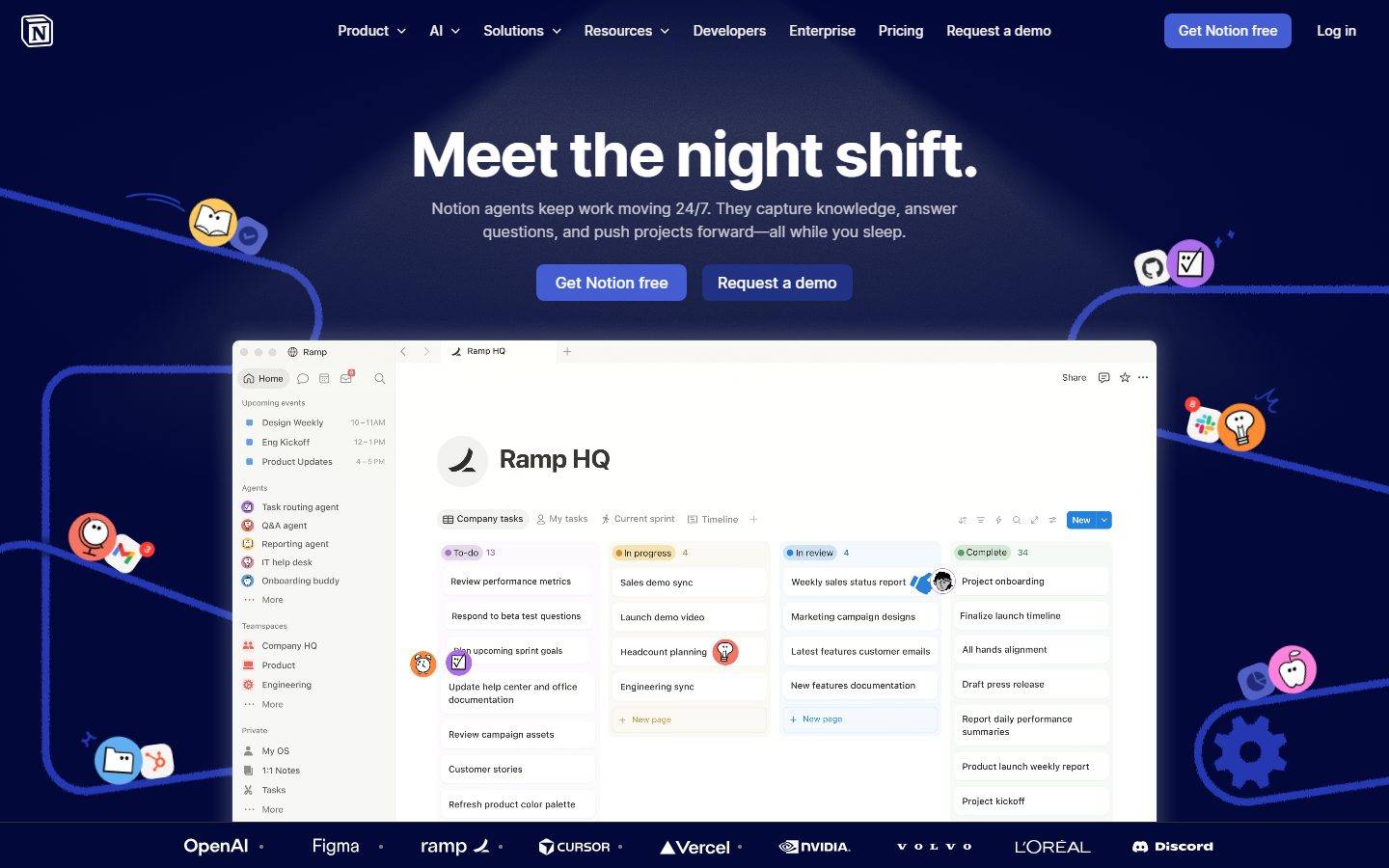
A productivity-software marketing surface that opens on a deep navy hero (NotionInter display headlines in pure white) and resolves into bright white content sections holding pastel-tinted product UI cards. The system is near-monochrome at the structural layer — black body text on white, white text on navy — with a saturated blue primary CTA and a wide pastel accent palette that lives almost entirely inside embedded product screenshots (peach, rose, lilac, amber agent tiles). Brand voltage comes from the tightly-tracked NotionInter display type and from real Notion app chrome shown directly inside marketing cards.
---
version: alpha
name: Notion-design-analysis
description: A productivity-software marketing surface that opens on a deep navy hero (NotionInter display headlines in pure white) and resolves into bright white content sections holding pastel-tinted product UI cards. The system is near-monochrome at the structural layer — black body text on white, white text on navy — with a saturated blue primary CTA and a wide pastel accent palette that lives almost entirely inside embedded product screenshots (peach, rose, lilac, amber agent tiles). Brand voltage comes from the tightly-tracked NotionInter display type and from real Notion app chrome shown directly inside marketing cards.

colors:
  ink: "#000000"
  on-primary: "#f6f5f4"
  on-dark: "#ffffff"
  neutral: "#a39e98"
  neutral-strong: "#615d59"
  neutral-soft: "#78736f"
  accent-blue: "#097fe8"
  accent-blue-light: "#62aef0"
  accent-blue-deep: "#0075de"
  accent-navy: "#02093a"
  accent-red: "#f64932"
  accent-orange: "#ff6d00"
  accent-amber: "#ffb110"
  accent-brown: "#9c7054"
  accent-violet: "#9849e8"
  accent-teal: "#27918d"
  surface-card: "#ffffff"
  surface-cream: "#fcf8f5"
  surface-peach: "#fff5ed"
  surface-rose: "#fef3f1"
  surface-lilac: "#f8f5fc"

typography:
  display-xl:
    fontFamily: "NotionInter, Inter, sans-serif"
    fontSize: 64px
    fontWeight: 700
    lineHeight: 1.0
    letterSpacing: -2.125px
  display-lg:
    fontFamily: "NotionInter, Inter, sans-serif"
    fontSize: 54px
    fontWeight: 700
    lineHeight: 1.037
    letterSpacing: -1.875px
  label:
    fontFamily: "NotionInter, Inter, sans-serif"
    fontSize: 14px
    fontWeight: 400
    lineHeight: 1.429
    letterSpacing: normal
  body:
    fontFamily: "NotionInter, Inter, sans-serif"
    fontSize: 16px
    fontWeight: 400
    lineHeight: 1.5
    letterSpacing: normal
  button:
    fontFamily: "NotionInter, Inter, sans-serif"
    fontSize: 16px
    fontWeight: 400
    lineHeight: 1.5
    letterSpacing: normal

rounded:
  xs: 4px
  sm: 8px
  md: 12px
  lg: 16px
  pill: 9999px

spacing:
  xxs: 4px
  xs: 8px
  sm: 12px
  md: 16px
  lg: 24px
  xl: 32px
  xxl: 56px

components:
  top-nav:
    backgroundColor: "{colors.accent-navy}"
    textColor: "{colors.on-dark}"
    typography: "{typography.body}"
  hero-band:
    backgroundColor: "{colors.accent-navy}"
    textColor: "{colors.on-dark}"
    typography: "{typography.display-xl}"
  button-primary:
    backgroundColor: "{colors.accent-blue}"
    textColor: "{colors.on-primary}"
    typography: "{typography.button}"
    rounded: "{rounded.xs}"
    padding: 5px 10px
  button-secondary:
    backgroundColor: transparent
    textColor: "{colors.on-dark}"
    typography: "{typography.button}"
    rounded: "{rounded.xs}"
    padding: 5px 10px
  card:
    backgroundColor: "{colors.surface-card}"
    textColor: "{colors.ink}"
    typography: "{typography.body}"
    rounded: "{rounded.md}"
  product-mockup-card:
    backgroundColor: "{colors.surface-card}"
    textColor: "{colors.ink}"
    typography: "{typography.body}"
    rounded: "{rounded.md}"
  agent-tile-peach:
    backgroundColor: "{colors.surface-peach}"
    textColor: "{colors.ink}"
    typography: "{typography.label}"
    rounded: "{rounded.md}"
  agent-tile-rose:
    backgroundColor: "{colors.surface-rose}"
    textColor: "{colors.ink}"
    typography: "{typography.label}"
    rounded: "{rounded.md}"
  agent-tile-lilac:
    backgroundColor: "{colors.surface-lilac}"
    textColor: "{colors.ink}"
    typography: "{typography.label}"
    rounded: "{rounded.md}"
  footer:
    backgroundColor: "{colors.surface-card}"
    textColor: "{colors.ink}"
    typography: "{typography.label}"
---

## Overview

Notion's landing surface is a two-mode marketing page. It opens on a deep navy hero (`{colors.accent-navy}` — #02093a) carrying a giant NotionInter headline in pure white (`{colors.on-dark}` — #ffffff), then drops into bright white content sections (`{colors.surface-card}` — #ffffff) where black running text (`{colors.ink}` — #000000) sits against white and pastel-tinted product cards. The structural palette is near-monochrome — white-on-navy in the hero, black-on-white below — and color voltage is reserved almost entirely for the saturated blue primary CTA and for the pastel agent/product tiles embedded inside the marketing flow.

Type voice is single-family: **NotionInter** (Notion's bundled Inter variant) runs every role from the 64px display headline to 14px labels. The display sizes carry aggressive negative tracking — h1 at -2.125px, h2 at -1.875px — which gives the headlines their tight, confident, slightly-condensed feel. Everything below display weight drops to a comfortable 16px / weight-400 body at 1.5 line-height.

Component voltage comes from **real Notion app chrome shown directly inside marketing cards** — the hero centers a full Notion workspace mockup (the "Ramp HQ" kanban board), and lower bands show agent panels, AI meeting notes, and knowledge-base views as live product fragments. Notion doesn't illustrate the product; it shows the actual interface at scale inside white cards with soft multi-layer drop shadows.

**Key Characteristics:**
- Dark navy hero (`{colors.accent-navy}` — #02093a) with white display headlines, transitioning to white content sections below — a deliberate dark-to-light editorial rhythm.
- Single typeface — **NotionInter** (Inter variant) — used across all roles. Display sizes use heavy negative letter-spacing (-1.875px to -2.125px); body and labels use normal tracking.
- Saturated blue primary CTA (`{colors.accent-blue}` — #097fe8) with off-white label (`{colors.on-primary}` — #f6f5f4) and a tight `{rounded.xs}` (4px) radius and compact 5px × 10px padding.
- A wide pastel accent set (peach, rose, lilac, cream, amber, orange, violet, teal, brick-red) that appears almost exclusively inside embedded product UI tiles — never on structural surfaces or primary actions.
- White product-mockup cards at `{rounded.md}` (12px) carrying real Notion interface fragments, lifted by soft low-alpha multi-layer drop shadows.
- Neutral warm-grays (`{colors.neutral}` — #a39e98, `{colors.neutral-strong}` — #615d59, `{colors.neutral-soft}` — #78736f) for secondary labels and muted UI text.
- Border radius is hierarchical: `{rounded.xs}` (4px) for buttons, `{rounded.sm}` (8px) for small UI chips, `{rounded.md}` (12px) for cards, `{rounded.lg}` (16px) for larger containers, `{rounded.pill}` for circular/round elements.

## Colors

### Brand & Accent
- **Accent Blue** (`{colors.accent-blue}` — #097fe8): The primary action color — the "Get Notion free" CTA and inline highlights. The system's single saturated structural color.
- **Accent Blue Deep / Light** (`{colors.accent-blue-deep}` — #0075de, `{colors.accent-blue-light}` — #62aef0): Companion blues seen in product UI states, links, and status chips inside embedded mockups.
- **Accent Navy** (`{colors.accent-navy}` — #02093a): The deep hero background — the only large dark surface, closing the top of the page.
- **Pastel & Saturated Accent Set** — A broad accent family that appears inside embedded product tiles and agent cards: `{colors.accent-red}` (#f64932), `{colors.accent-orange}` (#ff6d00), `{colors.accent-amber}` (#ffb110), `{colors.accent-brown}` (#9c7054), `{colors.accent-violet}` (#9849e8), `{colors.accent-teal}` (#27918d). These read as the colored icons, agent avatars, and category markers shown in the Notion app chrome — never on hero CTAs.

### Surface
- **Surface Card** (`{colors.surface-card}` — #ffffff): The default white content floor and card background measured directly from card elements.
- **Surface Cream** (`{colors.surface-cream}` — #fcf8f5): A barely-tinted warm off-white used for soft section blocks.
- **Surface Peach** (`{colors.surface-peach}` — #fff5ed): Tinted agent/feature tile background.
- **Surface Rose** (`{colors.surface-rose}` — #fef3f1): Tinted feature/quote tile background.
- **Surface Lilac** (`{colors.surface-lilac}` — #f8f5fc): Tinted feature tile background.

### Text
- **Ink** (`{colors.ink}` — #000000): All body text on light surfaces (measured from `body.color`).
- **On Dark** (`{colors.on-dark}` — #ffffff): Hero headlines and any text on the navy hero (measured as the max-contrast h1 color).
- **On Primary** (`{colors.on-primary}` — #f6f5f4): The label color on the primary CTA — a warm off-white rather than pure white.
- **Neutral** (`{colors.neutral}` — #a39e98): Warm-gray secondary labels and muted UI text.
- **Neutral Strong** (`{colors.neutral-strong}` — #615d59): Slightly darker warm-gray for sub-labels.
- **Neutral Soft** (`{colors.neutral-soft}` — #78736f): Tertiary warm-gray captions / fine print.

### Note on Semantic Colors
No dedicated success / warning / error tokens were isolated in the analysis — the saturated accents (`{colors.accent-red}`, `{colors.accent-amber}`, `{colors.accent-teal}`) appear as product-UI status markers rather than a documented semantic scale. See Known Gaps.

## Typography

### Font Family
The system runs a single typeface, **NotionInter** — Notion's bundled variant of Inter — across every role. It handles display headlines, labels, body copy, and button text. There is no secondary display or monospace family in the measured set.

NotionInter is a custom bundled web font shipped by Notion. The closest open-source substitute is **Inter** (regular for body/labels, bold for display). When NotionInter is unavailable, render with `Inter, sans-serif` and preserve the negative display tracking (-2.125px on h1, -1.875px on h2) — that tight tracking is the most recognizable part of the type voice.

### Hierarchy

| Token | Size | Weight | Line Height | Letter Spacing | Use |
|---|---|---|---|---|---|
| `{typography.display-xl}` | 64px | 700 | 1.0 | -2.125px | Hero h1 ("Meet the night shift.") |
| `{typography.display-lg}` | 54px | 700 | 1.037 | -1.875px | Section heads ("Keep work moving 24/7.", "Try for free.") |
| `{typography.label}` | 14px | 400 | 1.429 | normal | Eyebrow labels, small UI text, footer links (h3 role) |
| `{typography.body}` | 16px | 400 | 1.5 | normal | Default running text, sub-headlines |
| `{typography.button}` | 16px | 400 | 1.5 | normal | Button labels |

### Principles
Display headlines carry heavy negative tracking and weight 700 — that combination produces the tight, dense, confident headline feel. Body and labels drop to weight 400 with normal tracking and a relaxed 1.5 line-height for readability. The boundary is by size and weight, not by family: never carry display-level negative tracking down into body copy, and never let body copy climb to 700.

## Layout

### Spacing System
- **Base unit:** 4px.
- **Tokens:** `{spacing.xxs}` 4px · `{spacing.xs}` 8px · `{spacing.sm}` 12px · `{spacing.md}` 16px · `{spacing.lg}` 24px · `{spacing.xl}` 32px · `{spacing.xxl}` 56px.
- **Dominant rhythm:** 8px is by far the most frequent gap (measured 131×), with 24px (63×) and 16px (39×) as the primary block spacings.
- **Card internal padding:** Compact — the measured primary button padding is 5px × 10px; card and tile internal spacing runs on the 8 / 16 / 24 multiples.

### Grid & Container
- **Hero:** Single centered column — headline, sub-line, and a button row stacked above a full-width product workspace mockup.
- **Content bands:** 2-up feature card grids ("Bring all your work together", "Ask your on-demand assistants") and horizontal agent-tile rows.
- **Footer:** Multi-column link list (Company / Download / Resources / Notion for).

### Whitespace Philosophy
The page alternates a dense navy hero (tightly tracked headline, compact button row) with airier white content bands. Spacing leans tight at the component level (8px dominant) but opens up between editorial bands. The result reads as engineered-and-efficient rather than luxurious.

## Elevation & Depth

| Level | Treatment | Use |
|---|---|---|
| Flat | No shadow | Hero band, content section backgrounds, base cards (measured card shadow is `none`) |
| Soft layered lift | Multi-layer low-alpha shadow: `rgba(0,0,0,0.01) 0px 0.175px 1.041px, rgba(0,0,0,0.02) 0px 0.8px 2.925px, rgba(0,0,0,0.027) 0px 2.025px 7.847px, rgba(0,0,0,0.04) 0px 4px 18px` | Product-mockup cards, embedded app chrome (measured 14×) |
| Deep layered lift | Heavier stacked shadow: `rgba(0,0,0,0.01) 0px 1px 3px … rgba(0,0,0,0.05) 0px 23px 52px` | The hero workspace mockup and large floating cards (measured 3×) |
| Glow | `rgba(255,255,255,0.2) 0px 0px 20px 5px` | Single soft white glow accent (e.g. spotlight behind hero headline) |

The elevation language is **soft, modern, multi-layer**. Shadows are built from 4–5 stacked low-alpha layers that simulate realistic light falloff rather than a single hard drop shadow. Base cards stay flat; depth is reserved for floating product mockups.

## Shapes

### Border Radius Scale

| Token | Value | Use |
|---|---|---|
| `{rounded.xs}` | 4px | Buttons (measured `button-primary`), small inline chips |
| `{rounded.sm}` | 8px | Small UI elements, input fields, chips (most frequent radius — measured 92×) |
| `{rounded.md}` | 12px | Cards (measured `card`), product-mockup cards, agent tiles |
| `{rounded.lg}` | 16px | Larger containers |
| `{rounded.pill}` | 9999px | Circular avatars, round icon buttons, fully-rounded pills |

A 5px radius was also measured at low frequency; it's treated as noise and folded into the `{rounded.xs}` / `{rounded.sm}` band.

### Photography & Mockup Geometry
Embedded Notion app fragments retain their native internal chrome (sidebar, kanban columns, status pills) — these carry their own rounded cells and avatars. Round avatars and icon markers use `{rounded.pill}`. Marketing product cards wrap these fragments in `{rounded.md}` (12px) corners.

## Components

### Navigation

**`top-nav`** — Horizontal nav sitting on the navy hero. Background `{colors.accent-navy}`, text `{colors.on-dark}`, type `{typography.body}`. Carries the Notion logo at left, primary menu (Product, AI, Solutions, Resources, Developers, Enterprise, Pricing, Request a demo) center, and a right cluster with a "Get Notion free" `{component.button-primary}` and a "Log in" text link.

### Hero

**`hero-band`** — Full-width navy band. Background `{colors.accent-navy}` (#02093a), text `{colors.on-dark}`, headline in `{typography.display-xl}`. Carries the centered h1, a `{typography.body}` sub-line in muted white, a two-button row (primary + secondary), and a large floating product-mockup workspace below lifted by the deep layered shadow.

### Buttons

**`button-primary`** — The signature blue CTA. Background `{colors.accent-blue}` (the blue fill is **derived** — the analysis measured only the button's text color #f6f5f4, radius 4px, and 5px × 10px padding; the blue maps to the measured accent `{colors.accent-blue}` #097fe8 observed on the CTA). Text `{colors.on-primary}` (#f6f5f4), type `{typography.button}`, rounded `{rounded.xs}` (4px), padding 5px × 10px.

**`button-secondary`** — The companion "Request a demo" action shown beside the primary in the hero. Background `transparent` on the navy hero, text `{colors.on-dark}`, type `{typography.button}`, rounded `{rounded.xs}`. (Its exact fill on the navy band was not measured — see Known Gaps.)

### Cards & Containers

**`card`** — The base content card. Background `{colors.surface-card}` (#ffffff), text `{colors.ink}`, rounded `{rounded.md}` (12px), shadow `none` (measured flat). The neutral white container for feature and content blocks.

**`product-mockup-card`** — A white card holding real Notion app chrome (kanban boards, docs, knowledge-base views, AI meeting notes). Background `{colors.surface-card}`, rounded `{rounded.md}`, lifted by the soft layered drop shadow. These cards show the actual product, not illustrations of it.

**`agent-tile-peach` / `agent-tile-rose` / `agent-tile-lilac`** — Pastel-tinted feature/agent tiles used in the "Ask your on-demand assistants" and feature bands. Backgrounds `{colors.surface-peach}` (#fff5ed), `{colors.surface-rose}` (#fef3f1), and `{colors.surface-lilac}` (#f8f5fc) respectively. Text `{colors.ink}`, labels in `{typography.label}`, rounded `{rounded.md}`. The pastel set is where the page's color lives.

### Footer

**`footer`** — Multi-column link footer on white. Background `{colors.surface-card}`, text `{colors.ink}`, links in `{typography.label}` (14px / 400). Columns cover Company / Download / Resources / Notion for, with the Notion wordmark and social row at left.

## Do's and Don'ts

### Do
- Reserve `{colors.accent-blue}` (#097fe8) for the primary CTA. The system is monochrome at the structural layer — blue is the single saturated action color.
- Keep the dark-to-light editorial rhythm: navy hero (`{colors.accent-navy}`) on top, white content (`{colors.surface-card}`) below.
- Use NotionInter (or Inter substitute) for everything, and preserve the heavy negative tracking on display sizes — it's the core of the type voice.
- Confine the pastel accent set (`{colors.surface-peach}`, `{colors.surface-rose}`, `{colors.surface-lilac}`, and the saturated icon accents) to product tiles and embedded app chrome.
- Embed real Notion app fragments inside white `{component.product-mockup-card}` containers — show the product, don't illustrate it.
- Lift floating product cards with the soft multi-layer shadow; keep base cards flat.
- Keep buttons tight: `{rounded.xs}` (4px) radius, compact 5px × 10px padding.

### Don't
- Don't paint structural surfaces or primary CTAs in the pastel accents — they belong inside product UI only.
- Don't drop display-level negative tracking onto body copy, and don't push body to weight 700.
- Don't add heavy single-drop shadows; the system uses stacked low-alpha layers.
- Don't introduce a second typeface — the entire page is one family.
- Don't put white text on the white content sections; white text belongs only on the navy hero.

## Responsive Behavior

The analysis captured a desktop landing render plus a long-scroll full-page composite; explicit breakpoint values were not measured. Observed behavior from the reference screenshots:

| Name | Width | Key Changes |
|---|---|---|
| Mobile | small | Nav collapses; hero workspace mockup scales down within the navy band; feature/agent grids stack 1-up |
| Tablet | mid | Feature card grids reduce to 1–2-up; agent tile rows wrap |
| Desktop | large | Full horizontal top-nav, centered hero with full-width mockup, 2-up feature card grids |

### Touch Targets
- `{component.button-primary}` measured padding is 5px × 10px — compact; effective tap area depends on label width. Verify against a 44px minimum at small breakpoints.

### Collapsing Strategy
- The navy hero retains its single-column center stack at all widths; the embedded workspace mockup scales proportionally.
- White content bands reduce column counts rather than shrinking card type.
- Footer link columns wrap to fewer columns on narrow screens.

(Breakpoint pixel values and reflow rules are not in the measured data — see Known Gaps.)

## Iteration Guide

1. Focus on ONE component at a time. Reference its YAML key directly (`{component.product-mockup-card}`, `{component.agent-tile-peach}`).
2. Variants (`-secondary`, pastel tile color swaps) live as separate entries in `components:`.
3. Use `{token.refs}` everywhere — never inline a hex in a component.
4. Never document hover. Default and Active/Pressed states only.
5. Display stays NotionInter/Inter 700 with negative tracking; body stays 400 / normal. Don't blur them.
6. Keep blue as the single structural accent; pastels stay inside product chrome.
7. When in doubt about emphasis: bigger NotionInter before more color.

## Known Gaps

- The primary button's **background fill was not measured** — analysis captured only its text color (#f6f5f4), 4px radius, and 5px × 10px padding. The blue fill is derived from the observed CTA and mapped to the measured accent `{colors.accent-blue}` (#097fe8).
- No distinct light-gray page **canvas** color was isolated. Content sections are documented against `{colors.surface-card}` (#ffffff); the faint warm off-whites (`{colors.surface-cream}` etc.) appear as section tints rather than a confirmed body canvas.
- **NotionInter** is Notion's bundled custom Inter variant; `fonts_licensed` was empty in the analysis, but it is not a public web font — an Inter substitute is documented in Typography.
- Only the **landing page** was captured. Nav-link, secondary-button, input, and tab specs beyond what's listed are inferred from screenshots, not measured.
- **Semantic color tokens** (success/warning/error) were not isolated — the saturated accents appear as product-UI markers, not a documented status scale.
- **Breakpoint pixel values, transition/animation timings, and form/validation states** are not in the measured data.
- The wide pastel accent set was measured at low frequency (3–14 occurrences each) and largely originates inside embedded product screenshots; exact usage rules for each tint are inferred.

<!-- Documented by Duply · real-world design systems as ready-to-use DESIGN.md for AI coding agents · https://duply.ai/notion/design-md -->
Color Palette
Accent
Neutrals
Typography
Spacing & Shape
Spacing
| Name | Value | Preview |
|---|---|---|
| xxs | 4px | |
| xs | 8px | |
| sm | 12px | |
| md | 16px | |
| lg | 24px | |
| xl | 32px | |
| xxl | 56px |
Border Radius
| Name | Value | Preview |
|---|---|---|
| xs | 4px | |
| sm | 8px | |
| md | 12px | |
| lg | 16px | |
| pill | 9999px |
FAQ
- What colors does Notion use?
- Notion's core palette includes #000000, #f6f5f4, #ffffff, #a39e98, #615d59. The full color set with usage roles (canvas, ink, surfaces, accent, semantic) is documented in the Notion DESIGN.md.
- What font does Notion use?
- Notion's primary typeface is NotionInter. The complete type scale (sizes, weights, line-height and letter-spacing per role), with an open substitute where the original is licensed, is documented in the DESIGN.md.
- What is the Notion design system?
- A productivity-software marketing surface that opens on a deep navy hero (NotionInter display headlines in pure white) and resolves into bright white content sections holding pastel-tinted product UI cards. The system is near-monochrome at the structural layer — black body text on white, white text
Get this as a working kit
- A complete production-stack template, styled like Notion, fully built and wired.
- One-time payment and the codebase is yours. No platform fees, no subscription.
Open it with Claude Code, Cursor, or any coding agent and build in plain language, then ship a complete web app.
- Your private DESIGN.md
- Marketing pages, blog, SEO & legal
- Email capture, newsletter & contact
- Accept payments (Stripe)
- Analytics (GA4 + PostHog)
- One-click deploy
- Auth, login & roles
- A full app dashboard, when you grow
More like this
---
version: alpha
name: Notion-design-analysis
description: A productivity-software marketing surface that opens on a deep navy hero (NotionInter display headlines in pure white) and resolves into bright white content sections holding pastel-tinted product UI cards. The system is near-monochrome at the structural layer — black body text on white, white text on navy — with a saturated blue primary CTA and a wide pastel accent palette that lives almost entirely inside embedded product screenshots (peach, rose, lilac, amber agent tiles). Brand voltage comes from the tightly-tracked NotionInter display type and from real Notion app chrome shown directly inside marketing cards.

colors:
  ink: "#000000"
  on-primary: "#f6f5f4"
  on-dark: "#ffffff"
  neutral: "#a39e98"
  neutral-strong: "#615d59"
  neutral-soft: "#78736f"
  accent-blue: "#097fe8"
  accent-blue-light: "#62aef0"
  accent-blue-deep: "#0075de"
  accent-navy: "#02093a"
  accent-red: "#f64932"
  accent-orange: "#ff6d00"
  accent-amber: "#ffb110"
  accent-brown: "#9c7054"
  accent-violet: "#9849e8"
  accent-teal: "#27918d"
  surface-card: "#ffffff"
  surface-cream: "#fcf8f5"
  surface-peach: "#fff5ed"
  surface-rose: "#fef3f1"
  surface-lilac: "#f8f5fc"

typography:
  display-xl:
    fontFamily: "NotionInter, Inter, sans-serif"
    fontSize: 64px
    fontWeight: 700
    lineHeight: 1.0
    letterSpacing: -2.125px
  display-lg:
    fontFamily: "NotionInter, Inter, sans-serif"
    fontSize: 54px
    fontWeight: 700
    lineHeight: 1.037
    letterSpacing: -1.875px
  label:
    fontFamily: "NotionInter, Inter, sans-serif"
    fontSize: 14px
    fontWeight: 400
    lineHeight: 1.429
    letterSpacing: normal
  body:
    fontFamily: "NotionInter, Inter, sans-serif"
    fontSize: 16px
    fontWeight: 400
    lineHeight: 1.5
    letterSpacing: normal
  button:
    fontFamily: "NotionInter, Inter, sans-serif"
    fontSize: 16px
    fontWeight: 400
    lineHeight: 1.5
    letterSpacing: normal

rounded:
  xs: 4px
  sm: 8px
  md: 12px
  lg: 16px
  pill: 9999px

spacing:
  xxs: 4px
  xs: 8px
  sm: 12px
  md: 16px
  lg: 24px
  xl: 32px
  xxl: 56px

components:
  top-nav:
    backgroundColor: "{colors.accent-navy}"
    textColor: "{colors.on-dark}"
    typography: "{typography.body}"
  hero-band:
    backgroundColor: "{colors.accent-navy}"
    textColor: "{colors.on-dark}"
    typography: "{typography.display-xl}"
  button-primary:
    backgroundColor: "{colors.accent-blue}"
    textColor: "{colors.on-primary}"
    typography: "{typography.button}"
    rounded: "{rounded.xs}"
    padding: 5px 10px
  button-secondary:
    backgroundColor: transparent
    textColor: "{colors.on-dark}"
    typography: "{typography.button}"
    rounded: "{rounded.xs}"
    padding: 5px 10px
  card:
    backgroundColor: "{colors.surface-card}"
    textColor: "{colors.ink}"
    typography: "{typography.body}"
    rounded: "{rounded.md}"
  product-mockup-card:
    backgroundColor: "{colors.surface-card}"
    textColor: "{colors.ink}"
    typography: "{typography.body}"
    rounded: "{rounded.md}"
  agent-tile-peach:
    backgroundColor: "{colors.surface-peach}"
    textColor: "{colors.ink}"
    typography: "{typography.label}"
    rounded: "{rounded.md}"
  agent-tile-rose:
    backgroundColor: "{colors.surface-rose}"
    textColor: "{colors.ink}"
    typography: "{typography.label}"
    rounded: "{rounded.md}"
  agent-tile-lilac:
    backgroundColor: "{colors.surface-lilac}"
    textColor: "{colors.ink}"
    typography: "{typography.label}"
    rounded: "{rounded.md}"
  footer:
    backgroundColor: "{colors.surface-card}"
    textColor: "{colors.ink}"
    typography: "{typography.label}"
---

## Overview

Notion's landing surface is a two-mode marketing page. It opens on a deep navy hero (`{colors.accent-navy}` — #02093a) carrying a giant NotionInter headline in pure white (`{colors.on-dark}` — #ffffff), then drops into bright white content sections (`{colors.surface-card}` — #ffffff) where black running text (`{colors.ink}` — #000000) sits against white and pastel-tinted product cards. The structural palette is near-monochrome — white-on-navy in the hero, black-on-white below — and color voltage is reserved almost entirely for the saturated blue primary CTA and for the pastel agent/product tiles embedded inside the marketing flow.

Type voice is single-family: **NotionInter** (Notion's bundled Inter variant) runs every role from the 64px display headline to 14px labels. The display sizes carry aggressive negative tracking — h1 at -2.125px, h2 at -1.875px — which gives the headlines their tight, confident, slightly-condensed feel. Everything below display weight drops to a comfortable 16px / weight-400 body at 1.5 line-height.

Component voltage comes from **real Notion app chrome shown directly inside marketing cards** — the hero centers a full Notion workspace mockup (the "Ramp HQ" kanban board), and lower bands show agent panels, AI meeting notes, and knowledge-base views as live product fragments. Notion doesn't illustrate the product; it shows the actual interface at scale inside white cards with soft multi-layer drop shadows.

**Key Characteristics:**
- Dark navy hero (`{colors.accent-navy}` — #02093a) with white display headlines, transitioning to white content sections below — a deliberate dark-to-light editorial rhythm.
- Single typeface — **NotionInter** (Inter variant) — used across all roles. Display sizes use heavy negative letter-spacing (-1.875px to -2.125px); body and labels use normal tracking.
- Saturated blue primary CTA (`{colors.accent-blue}` — #097fe8) with off-white label (`{colors.on-primary}` — #f6f5f4) and a tight `{rounded.xs}` (4px) radius and compact 5px × 10px padding.
- A wide pastel accent set (peach, rose, lilac, cream, amber, orange, violet, teal, brick-red) that appears almost exclusively inside embedded product UI tiles — never on structural surfaces or primary actions.
- White product-mockup cards at `{rounded.md}` (12px) carrying real Notion interface fragments, lifted by soft low-alpha multi-layer drop shadows.
- Neutral warm-grays (`{colors.neutral}` — #a39e98, `{colors.neutral-strong}` — #615d59, `{colors.neutral-soft}` — #78736f) for secondary labels and muted UI text.
- Border radius is hierarchical: `{rounded.xs}` (4px) for buttons, `{rounded.sm}` (8px) for small UI chips, `{rounded.md}` (12px) for cards, `{rounded.lg}` (16px) for larger containers, `{rounded.pill}` for circular/round elements.

## Colors

### Brand & Accent
- **Accent Blue** (`{colors.accent-blue}` — #097fe8): The primary action color — the "Get Notion free" CTA and inline highlights. The system's single saturated structural color.
- **Accent Blue Deep / Light** (`{colors.accent-blue-deep}` — #0075de, `{colors.accent-blue-light}` — #62aef0): Companion blues seen in product UI states, links, and status chips inside embedded mockups.
- **Accent Navy** (`{colors.accent-navy}` — #02093a): The deep hero background — the only large dark surface, closing the top of the page.
- **Pastel & Saturated Accent Set** — A broad accent family that appears inside embedded product tiles and agent cards: `{colors.accent-red}` (#f64932), `{colors.accent-orange}` (#ff6d00), `{colors.accent-amber}` (#ffb110), `{colors.accent-brown}` (#9c7054), `{colors.accent-violet}` (#9849e8), `{colors.accent-teal}` (#27918d). These read as the colored icons, agent avatars, and category markers shown in the Notion app chrome — never on hero CTAs.

### Surface
- **Surface Card** (`{colors.surface-card}` — #ffffff): The default white content floor and card background measured directly from card elements.
- **Surface Cream** (`{colors.surface-cream}` — #fcf8f5): A barely-tinted warm off-white used for soft section blocks.
- **Surface Peach** (`{colors.surface-peach}` — #fff5ed): Tinted agent/feature tile background.
- **Surface Rose** (`{colors.surface-rose}` — #fef3f1): Tinted feature/quote tile background.
- **Surface Lilac** (`{colors.surface-lilac}` — #f8f5fc): Tinted feature tile background.

### Text
- **Ink** (`{colors.ink}` — #000000): All body text on light surfaces (measured from `body.color`).
- **On Dark** (`{colors.on-dark}` — #ffffff): Hero headlines and any text on the navy hero (measured as the max-contrast h1 color).
- **On Primary** (`{colors.on-primary}` — #f6f5f4): The label color on the primary CTA — a warm off-white rather than pure white.
- **Neutral** (`{colors.neutral}` — #a39e98): Warm-gray secondary labels and muted UI text.
- **Neutral Strong** (`{colors.neutral-strong}` — #615d59): Slightly darker warm-gray for sub-labels.
- **Neutral Soft** (`{colors.neutral-soft}` — #78736f): Tertiary warm-gray captions / fine print.

### Note on Semantic Colors
No dedicated success / warning / error tokens were isolated in the analysis — the saturated accents (`{colors.accent-red}`, `{colors.accent-amber}`, `{colors.accent-teal}`) appear as product-UI status markers rather than a documented semantic scale. See Known Gaps.

## Typography

### Font Family
The system runs a single typeface, **NotionInter** — Notion's bundled variant of Inter — across every role. It handles display headlines, labels, body copy, and button text. There is no secondary display or monospace family in the measured set.

NotionInter is a custom bundled web font shipped by Notion. The closest open-source substitute is **Inter** (regular for body/labels, bold for display). When NotionInter is unavailable, render with `Inter, sans-serif` and preserve the negative display tracking (-2.125px on h1, -1.875px on h2) — that tight tracking is the most recognizable part of the type voice.

### Hierarchy

| Token | Size | Weight | Line Height | Letter Spacing | Use |
|---|---|---|---|---|---|
| `{typography.display-xl}` | 64px | 700 | 1.0 | -2.125px | Hero h1 ("Meet the night shift.") |
| `{typography.display-lg}` | 54px | 700 | 1.037 | -1.875px | Section heads ("Keep work moving 24/7.", "Try for free.") |
| `{typography.label}` | 14px | 400 | 1.429 | normal | Eyebrow labels, small UI text, footer links (h3 role) |
| `{typography.body}` | 16px | 400 | 1.5 | normal | Default running text, sub-headlines |
| `{typography.button}` | 16px | 400 | 1.5 | normal | Button labels |

### Principles
Display headlines carry heavy negative tracking and weight 700 — that combination produces the tight, dense, confident headline feel. Body and labels drop to weight 400 with normal tracking and a relaxed 1.5 line-height for readability. The boundary is by size and weight, not by family: never carry display-level negative tracking down into body copy, and never let body copy climb to 700.

## Layout

### Spacing System
- **Base unit:** 4px.
- **Tokens:** `{spacing.xxs}` 4px · `{spacing.xs}` 8px · `{spacing.sm}` 12px · `{spacing.md}` 16px · `{spacing.lg}` 24px · `{spacing.xl}` 32px · `{spacing.xxl}` 56px.
- **Dominant rhythm:** 8px is by far the most frequent gap (measured 131×), with 24px (63×) and 16px (39×) as the primary block spacings.
- **Card internal padding:** Compact — the measured primary button padding is 5px × 10px; card and tile internal spacing runs on the 8 / 16 / 24 multiples.

### Grid & Container
- **Hero:** Single centered column — headline, sub-line, and a button row stacked above a full-width product workspace mockup.
- **Content bands:** 2-up feature card grids ("Bring all your work together", "Ask your on-demand assistants") and horizontal agent-tile rows.
- **Footer:** Multi-column link list (Company / Download / Resources / Notion for).

### Whitespace Philosophy
The page alternates a dense navy hero (tightly tracked headline, compact button row) with airier white content bands. Spacing leans tight at the component level (8px dominant) but opens up between editorial bands. The result reads as engineered-and-efficient rather than luxurious.

## Elevation & Depth

| Level | Treatment | Use |
|---|---|---|
| Flat | No shadow | Hero band, content section backgrounds, base cards (measured card shadow is `none`) |
| Soft layered lift | Multi-layer low-alpha shadow: `rgba(0,0,0,0.01) 0px 0.175px 1.041px, rgba(0,0,0,0.02) 0px 0.8px 2.925px, rgba(0,0,0,0.027) 0px 2.025px 7.847px, rgba(0,0,0,0.04) 0px 4px 18px` | Product-mockup cards, embedded app chrome (measured 14×) |
| Deep layered lift | Heavier stacked shadow: `rgba(0,0,0,0.01) 0px 1px 3px … rgba(0,0,0,0.05) 0px 23px 52px` | The hero workspace mockup and large floating cards (measured 3×) |
| Glow | `rgba(255,255,255,0.2) 0px 0px 20px 5px` | Single soft white glow accent (e.g. spotlight behind hero headline) |

The elevation language is **soft, modern, multi-layer**. Shadows are built from 4–5 stacked low-alpha layers that simulate realistic light falloff rather than a single hard drop shadow. Base cards stay flat; depth is reserved for floating product mockups.

## Shapes

### Border Radius Scale

| Token | Value | Use |
|---|---|---|
| `{rounded.xs}` | 4px | Buttons (measured `button-primary`), small inline chips |
| `{rounded.sm}` | 8px | Small UI elements, input fields, chips (most frequent radius — measured 92×) |
| `{rounded.md}` | 12px | Cards (measured `card`), product-mockup cards, agent tiles |
| `{rounded.lg}` | 16px | Larger containers |
| `{rounded.pill}` | 9999px | Circular avatars, round icon buttons, fully-rounded pills |

A 5px radius was also measured at low frequency; it's treated as noise and folded into the `{rounded.xs}` / `{rounded.sm}` band.

### Photography & Mockup Geometry
Embedded Notion app fragments retain their native internal chrome (sidebar, kanban columns, status pills) — these carry their own rounded cells and avatars. Round avatars and icon markers use `{rounded.pill}`. Marketing product cards wrap these fragments in `{rounded.md}` (12px) corners.

## Components

### Navigation

**`top-nav`** — Horizontal nav sitting on the navy hero. Background `{colors.accent-navy}`, text `{colors.on-dark}`, type `{typography.body}`. Carries the Notion logo at left, primary menu (Product, AI, Solutions, Resources, Developers, Enterprise, Pricing, Request a demo) center, and a right cluster with a "Get Notion free" `{component.button-primary}` and a "Log in" text link.

### Hero

**`hero-band`** — Full-width navy band. Background `{colors.accent-navy}` (#02093a), text `{colors.on-dark}`, headline in `{typography.display-xl}`. Carries the centered h1, a `{typography.body}` sub-line in muted white, a two-button row (primary + secondary), and a large floating product-mockup workspace below lifted by the deep layered shadow.

### Buttons

**`button-primary`** — The signature blue CTA. Background `{colors.accent-blue}` (the blue fill is **derived** — the analysis measured only the button's text color #f6f5f4, radius 4px, and 5px × 10px padding; the blue maps to the measured accent `{colors.accent-blue}` #097fe8 observed on the CTA). Text `{colors.on-primary}` (#f6f5f4), type `{typography.button}`, rounded `{rounded.xs}` (4px), padding 5px × 10px.

**`button-secondary`** — The companion "Request a demo" action shown beside the primary in the hero. Background `transparent` on the navy hero, text `{colors.on-dark}`, type `{typography.button}`, rounded `{rounded.xs}`. (Its exact fill on the navy band was not measured — see Known Gaps.)

### Cards & Containers

**`card`** — The base content card. Background `{colors.surface-card}` (#ffffff), text `{colors.ink}`, rounded `{rounded.md}` (12px), shadow `none` (measured flat). The neutral white container for feature and content blocks.

**`product-mockup-card`** — A white card holding real Notion app chrome (kanban boards, docs, knowledge-base views, AI meeting notes). Background `{colors.surface-card}`, rounded `{rounded.md}`, lifted by the soft layered drop shadow. These cards show the actual product, not illustrations of it.

**`agent-tile-peach` / `agent-tile-rose` / `agent-tile-lilac`** — Pastel-tinted feature/agent tiles used in the "Ask your on-demand assistants" and feature bands. Backgrounds `{colors.surface-peach}` (#fff5ed), `{colors.surface-rose}` (#fef3f1), and `{colors.surface-lilac}` (#f8f5fc) respectively. Text `{colors.ink}`, labels in `{typography.label}`, rounded `{rounded.md}`. The pastel set is where the page's color lives.

### Footer

**`footer`** — Multi-column link footer on white. Background `{colors.surface-card}`, text `{colors.ink}`, links in `{typography.label}` (14px / 400). Columns cover Company / Download / Resources / Notion for, with the Notion wordmark and social row at left.

## Do's and Don'ts

### Do
- Reserve `{colors.accent-blue}` (#097fe8) for the primary CTA. The system is monochrome at the structural layer — blue is the single saturated action color.
- Keep the dark-to-light editorial rhythm: navy hero (`{colors.accent-navy}`) on top, white content (`{colors.surface-card}`) below.
- Use NotionInter (or Inter substitute) for everything, and preserve the heavy negative tracking on display sizes — it's the core of the type voice.
- Confine the pastel accent set (`{colors.surface-peach}`, `{colors.surface-rose}`, `{colors.surface-lilac}`, and the saturated icon accents) to product tiles and embedded app chrome.
- Embed real Notion app fragments inside white `{component.product-mockup-card}` containers — show the product, don't illustrate it.
- Lift floating product cards with the soft multi-layer shadow; keep base cards flat.
- Keep buttons tight: `{rounded.xs}` (4px) radius, compact 5px × 10px padding.

### Don't
- Don't paint structural surfaces or primary CTAs in the pastel accents — they belong inside product UI only.
- Don't drop display-level negative tracking onto body copy, and don't push body to weight 700.
- Don't add heavy single-drop shadows; the system uses stacked low-alpha layers.
- Don't introduce a second typeface — the entire page is one family.
- Don't put white text on the white content sections; white text belongs only on the navy hero.

## Responsive Behavior

The analysis captured a desktop landing render plus a long-scroll full-page composite; explicit breakpoint values were not measured. Observed behavior from the reference screenshots:

| Name | Width | Key Changes |
|---|---|---|
| Mobile | small | Nav collapses; hero workspace mockup scales down within the navy band; feature/agent grids stack 1-up |
| Tablet | mid | Feature card grids reduce to 1–2-up; agent tile rows wrap |
| Desktop | large | Full horizontal top-nav, centered hero with full-width mockup, 2-up feature card grids |

### Touch Targets
- `{component.button-primary}` measured padding is 5px × 10px — compact; effective tap area depends on label width. Verify against a 44px minimum at small breakpoints.

### Collapsing Strategy
- The navy hero retains its single-column center stack at all widths; the embedded workspace mockup scales proportionally.
- White content bands reduce column counts rather than shrinking card type.
- Footer link columns wrap to fewer columns on narrow screens.

(Breakpoint pixel values and reflow rules are not in the measured data — see Known Gaps.)

## Iteration Guide

1. Focus on ONE component at a time. Reference its YAML key directly (`{component.product-mockup-card}`, `{component.agent-tile-peach}`).
2. Variants (`-secondary`, pastel tile color swaps) live as separate entries in `components:`.
3. Use `{token.refs}` everywhere — never inline a hex in a component.
4. Never document hover. Default and Active/Pressed states only.
5. Display stays NotionInter/Inter 700 with negative tracking; body stays 400 / normal. Don't blur them.
6. Keep blue as the single structural accent; pastels stay inside product chrome.
7. When in doubt about emphasis: bigger NotionInter before more color.

## Known Gaps

- The primary button's **background fill was not measured** — analysis captured only its text color (#f6f5f4), 4px radius, and 5px × 10px padding. The blue fill is derived from the observed CTA and mapped to the measured accent `{colors.accent-blue}` (#097fe8).
- No distinct light-gray page **canvas** color was isolated. Content sections are documented against `{colors.surface-card}` (#ffffff); the faint warm off-whites (`{colors.surface-cream}` etc.) appear as section tints rather than a confirmed body canvas.
- **NotionInter** is Notion's bundled custom Inter variant; `fonts_licensed` was empty in the analysis, but it is not a public web font — an Inter substitute is documented in Typography.
- Only the **landing page** was captured. Nav-link, secondary-button, input, and tab specs beyond what's listed are inferred from screenshots, not measured.
- **Semantic color tokens** (success/warning/error) were not isolated — the saturated accents appear as product-UI markers, not a documented status scale.
- **Breakpoint pixel values, transition/animation timings, and form/validation states** are not in the measured data.
- The wide pastel accent set was measured at low frequency (3–14 occurrences each) and largely originates inside embedded product screenshots; exact usage rules for each tint are inferred.

<!-- Documented by Duply · real-world design systems as ready-to-use DESIGN.md for AI coding agents · https://duply.ai/notion/design-md -->